Loading
Get Ca 1108
How it works
-

Open form follow the instructions
-

Easily sign the form with your finger
-

Send filled & signed form or save
How to fill out the Ca 1108 online
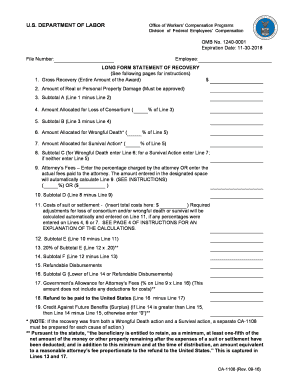
Filling out the Ca 1108 form is an essential step in the process of managing compensation claims related to federal employees' injuries. This guide will walk you through each section of the form, providing clear instructions to ensure accurate and complete submission.
Follow the steps to complete the Ca 1108 online effectively.
- Click ‘Get Form’ button to access the Ca 1108 form and open it in the editor.
- Enter the file number associated with your claim. This is a crucial identifier for your case.
- Fill in the employee's name as it appears in official records. Ensure that the spelling is correct for accurate processing.
- Report the gross recovery amount received from the lawsuit or settlement on Line 1. This figure represents the total award before any deductions.
- For Line 2, detail any amounts for real or personal property damage related to your case. Ensure to provide the necessary documentation for verification.
- Calculate Subtotal A by subtracting the amount on Line 2 from Line 1, and enter this value on Line 3.
- If applicable, allocate a percentage for loss of consortium on Line 4. This percentage must adhere to the guidelines provided for approval.
- Calculate Subtotal B by subtracting the amount from Line 4 from Subtotal A (Line 3), and enter this on Line 5.
- For wrongful death and survival actions, allocate the appropriate amounts on Lines 6 and 7, respectively. Each allocation must follow the specified guidelines.
- Calculate Subtotal C based on the entries from Lines 6 and 7, or use Line 5 if neither applies. Enter this value in Line 8.
- Indicate attorney’s fees on Line 9 as a percentage or a flat fee. The form will automatically compute the associated deductions based on your entry.
- Calculate Subtotal D by subtracting the attorney's fees (Line 9) from Subtotal C (Line 8), then enter the result on Line 10.
- Enter any court costs on Line 11, ensuring these are itemized and compliant with the necessary regulations.
- Calculate Subtotal E by deducting the costs in Line 11 from Subtotal D in Line 10, and enter the result on Line 12.
- On Line 13, calculate 20% of Subtotal E to confirm the amount to be provided to the claimant, noting that this is not subject to deductions.
- Assess Subtotal F by subtracting the 20% guarantee (Line 13) from Subtotal E (Line 12) and record this on Line 14.
- Enter the refundable disbursements from OWCP in Line 15. Ensure that you subtract any previous amounts recorded on prior forms.
- Identify Subtotal G as the lesser of Subtotal F (Line 14) or refundable disbursements (Line 15), and document this on Line 16.
- Calculate the government’s allowance for attorney’s fees (Line 17) using the attorney’s fee percentage from Line 9 and Subtotal G (Line 16).
- Determine the refund amount to be paid back to the government as a result of this claim's calculations and record it on Line 18.
- Lastly, if applicable, calculate and record any credit against future benefits on Line 19, based on the amounts from Subtotal F and the refundable disbursements.
Complete and submit your Ca 1108 form online to ensure timely processing of your claim.
Related links form
There are two different ways to settle your case: Stipulations with Request for Award (stips) Payments - You and the claims administrator agree on the amount of temporary or permanent disability payments you will receive. ... Compromise and Release (C&R)