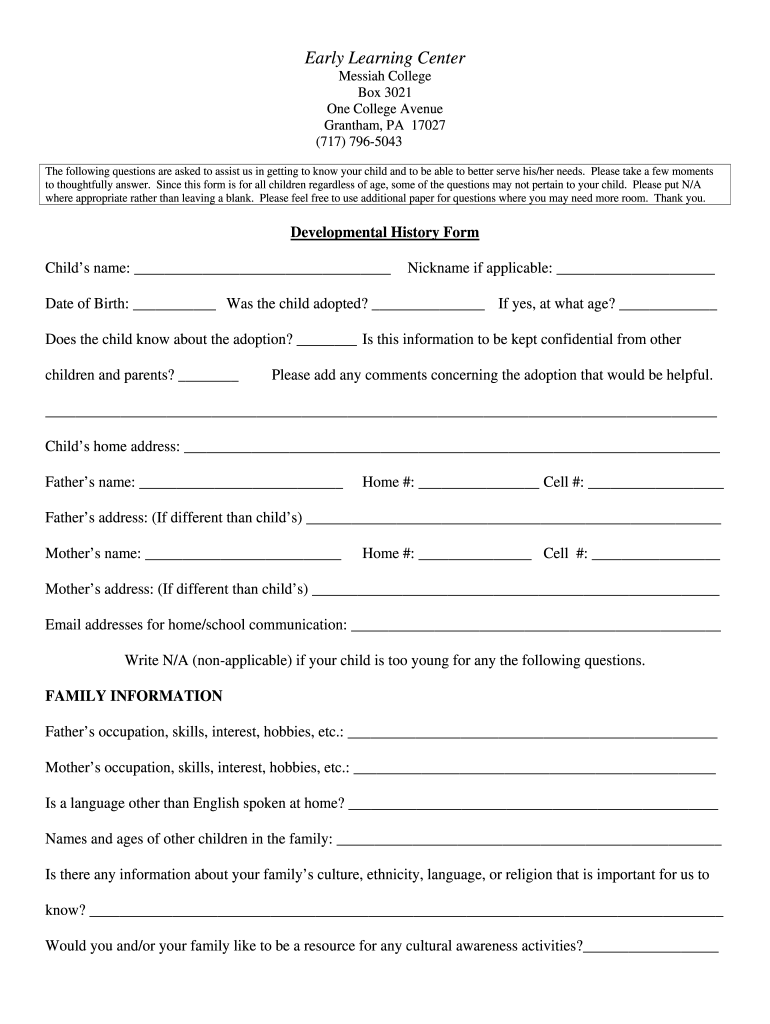
Early Learning Center Messiah College Box 3021 One College Avenue Grantham, PA 17027 (717) 796-5043 The following questions are asked to assist us in getting to know your child and to be able to better.
Loading

Open form follow the instructions

Easily sign the form with your finger

Send filled & signed form or save
How to fill out the Messiah College Developmental History Form online
Filling out the Messiah College Developmental History Form online is a crucial step for parents looking to provide important information about their child. This guide will walk you through each section, ensuring you clearly communicate your child's needs to better facilitate their care and development.
Follow the steps to complete the form efficiently.
- Click the ‘Get Form’ button to obtain the online version of the Messiah College Developmental History Form. Opening this form prepares you for the next steps.
- Begin with the child's basic information. Enter your child's full name, any applicable nickname, and the date of birth. If adoption applies, indicate whether the child knows about it and if confidentiality is requested.
- Provide the child’s home address and parents' contact information, including both home and cell numbers. Additionally, include email addresses for effective communication.
- Fill in family information, noting parents' occupations, interests, and whether a language other than English is spoken at home. Include information about other siblings and any cultural or religious backgrounds important for the child's development.
- Detail your child's physical health history by answering questions regarding past and current health issues, allergies, medication, and any hospitalizations.
- Complete the developmental section by assessing your child's communication, mobility, sensory abilities, and any behavioral concerns.
- In the daily living section, describe your child's eating patterns, toileting habits, sleeping routines, and any assistance they need in dressing.
- Include information on your child's social relationships and play preferences. Answer questions about previous childcare experiences, playmate interactions, and any specific fears your child may have.
- Look for spaces provided for parental signatures and dates at the bottom of the form. Ensure both you and your child's teacher sign as necessary.
- Finally, review the directory information and permission sections related to pictures and field trips, providing your consent where applicable.
- Once all sections are completed, ensure you save your changes. You may have options to download, print, or share the completed form directly from the online platform.
Complete your documentation online today to ensure your child's information is accurately represented and accessible.
Experience a faster way to fill out and sign forms on the web. Access the most extensive library of templates available.
Related content
by JP Branson · 1987 · Cited by 1 — MESSIAH COLLEGE. (Private). LD Program: No...
by KS Phipps — Messiah's edu- cational program is designed to challenge and prepare...
by PA Schrodt · 2012 · Cited by 1 — 2 VERB CODEBOOK. 6. 2.1 MAKE PUBLIC STATEMENT ....
Get answers to your most pressing questions about US Legal Forms API.
Is Messiah University a dry campus?
Messiah University is indeed a dry campus, which means that the possession and consumption of alcohol are not permitted on its grounds. This policy aligns with the university’s values and commitment to maintaining a safe and healthy community. Students can benefit from this setting, promoting a focus on personal and academic growth. When filling out the Messiah College Developmental History Form, you can consider how this policy impacts your own lifestyle and choices.
Is Messiah University LGBTQ friendly?
While Messiah University's policies may not fully align with traditional LGBTQ+ advocacy, the institution strives to foster a welcoming environment for all students. Discussions about inclusivity are ongoing, and students are encouraged to voice their concerns and experiences. The university is taking steps toward greater inclusion, which resonates with many in the community. Reflecting your experience on the Messiah College Developmental History Form can support the university's journey toward improvement.
Does Messiah University support LGBTQ?
Messiah University is currently navigating the conversation around LGBTQ+ support, balancing its religious mission with the needs of all students. The campus community is generally supportive and open to dialogue about LGBTQ issues, promoting respect and understanding. If you are an LGBTQ student, the university offers various resources and support systems. Including this information in your Messiah College Developmental History Form can help facilitate a better understanding of your needs.
Is Messiah University very religious?
Messiah University is known for its strong Christian values and commitment to faith-based education. The university integrates faith into its curriculum and campus life, fostering a spiritually enriching environment. Many students appreciate this aspect as it complements their personal beliefs and enhances their educational journey. When completing the Messiah College Developmental History Form, you may find it important to reflect your own spiritual background as part of this holistic process.
How conservative is Messiah University?
Messiah University has a reputation for being more conservative, reflecting its Christian foundation and values. However, the community is open to diverse thoughts and perspectives, allowing for healthy discussion and growth. Students can engage in various campus activities that reflect both conservative and progressive viewpoints. For any student looking to share their background, the Messiah College Developmental History Form provides an opportunity to do so in a respectful manner.
What are the demographics of Messiah University?
Messiah University enjoys a diverse student body with individuals coming from various backgrounds, cultures, and geographic locations. Approximately 2,500 students attend the university, with a balance of undergraduate and graduate enrollment. This diversity enriches the campus experience and fosters a sense of community. Additionally, if you're looking to fill out the Messiah College Developmental History Form, the university encourages accurate representation of demographic information.
How selective is Messiah University?
Messiah University has a moderately selective admissions process, considering various factors such as academic performance and personal essays. When applying, be sure to present your accomplishments and aspirations clearly. The Messiah College Developmental History Form allows you to highlight key aspects of your background, helping the admissions team understand your qualifications better.
Is Messiah College good?
Messiah College consistently receives positive reviews for its quality of education and supportive community. Its focus on academic excellence and personal growth makes it a desirable choice for many students. When discussing your academic and personal experiences on the Messiah College Developmental History Form, providing details about your aspirations can help illustrate why you're a good fit for the college.
How do I change my major at Messiah University?
Changing your major at Messiah University involves a straightforward process. You should speak with your academic advisor to discuss your goals and fill out the necessary forms. Completing the Messiah College Developmental History Form may offer insights into your academic journey, helping advisors guide you in making the best choice.
What denomination is Messiah College?
Messiah College is affiliated with the Brethren in Christ Church but welcomes students from all Christian denominations. This inclusive environment fosters a diverse community where everyone can flourish in their faith. Be sure to highlight your religious background on the Messiah College Developmental History Form, as it helps the college understand your unique perspective.
Use professional pre-built templates to fill in and sign documents online faster. Get access to thousands of forms.
If you believe that this page should be taken down, please follow our DMCA take down process here.