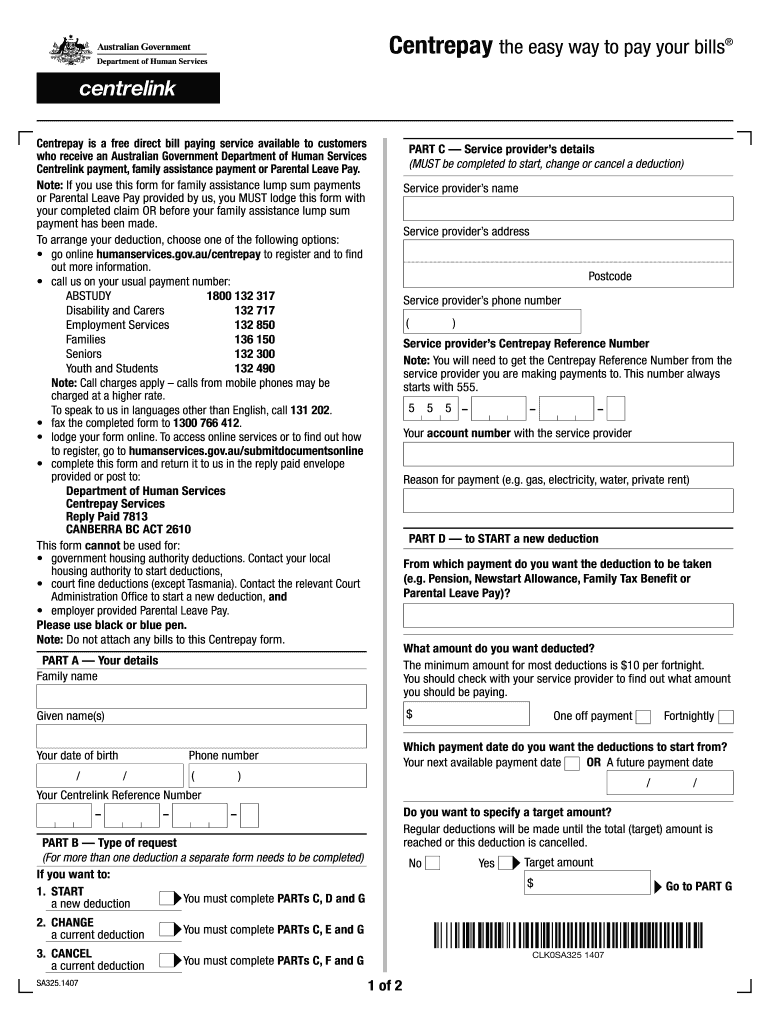
Print Instructions Clear Centrepay the easy way to pay your bills Centrepay is a free direct bill paying service available to customers who receive an Australian Government Department of Human Services.

Open form follow the instructions

Easily sign the form with your finger

Send filled & signed form or save
How to fill out the Sa325 online
The Sa325 form is a crucial document for users looking to set up, change, or cancel deductions through Centrepay, a convenient bill payment service for recipients of certain Australian Government payments. This guide will provide step-by-step instructions to help you complete the form efficiently.
Follow the steps to successfully complete the Sa325 form.
- Click 'Get Form' button to access the Sa325 form and open it in the designated viewer.
- In Part A, enter your family name, given name(s), date of birth, phone number, and Centrelink Reference Number. Specify the amount you wish to deduct, ensuring it meets the minimum deduction requirement.
- In Part B, indicate the type of request: START (if this is a new deduction), CHANGE (to modify an existing deduction), or CANCEL (to terminate a current deduction). Complete the appropriate sections (C, D and G for START; C, E and G for CHANGE; C, F and G for CANCEL).
- In Part C, provide the service provider's details, including their name, address, phone number, and Centrepay Reference Number, which starts with 555. You will also need to input your account number with the provider and the reason for payment, such as gas or electricity.
- In Part D, state which payment you want the deductions to be taken from, like a pension or family tax benefit. Specify the desired start date for the deductions.
- For a CHANGE request in Part E, provide the new deduction amount and the start payment date. If applicable, specify an end payment date for a temporary adjustment.
- In Part F, for a CANCEL request, indicate the date when you wish the cancellation to take effect and ensure you have alternative arrangements in place.
- Finally, in Part G, read the authorisation statement, sign, and date it to confirm your permissions regarding the deduction. Once completed, you can save your changes, download, print, or share the form.
Complete your documents online to ensure a smooth deduction process.
Experience a faster way to fill out and sign forms on the web. Access the most extensive library of templates available.
Related content
This bulletin provides the procedure to improve the logic of the Electronic Stability...
Brunswick matrix SA325. Jesús Leal / Luna y Montalvo · Description: Male vocal duet...
Donald Carl Johanson (born June 28, 1943) is an American paleoanthropologist. He is known...
Use professional pre-built templates to fill in and sign documents online faster. Get access to thousands of forms.
If you believe that this page should be taken down, please follow our DMCA take down process here.
This form is available in several versions. Select the version you need from the drop-down list below.