Loading
Form preview
  • US Legal Forms
  • Other Templates
  • More Forms
  • More Multi-State Forms
  • Bupa Medical History Form

Get Bupa Medical History Form

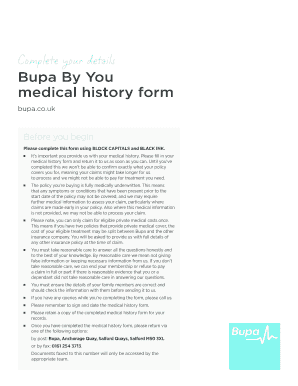
Complete your detailsBupa By You medical history form bupa.co.ukBefore you begin Please complete this form using BLOCK CAPITALS and BLACK INK. JJJJJJJJJJIts important you provide us with your medical.

How it works

  1. Open form

    Open form follow the instructions

  2. Easily sign form

    Easily sign the form with your finger

  3. Share form

    Send filled & signed form or save

How to fill out the Bupa Medical History Form online

Completing the Bupa Medical History Form online is an essential step in managing your healthcare coverage. This guide will walk you through the process, ensuring that you provide accurate and complete information regarding your medical history.

Follow the steps to complete the form accurately.

  1. Click 'Get Form' button to access the Bupa Medical History Form and begin the completion process.
  2. Provide your Bupa membership details. Indicate whether you are already a member by selecting 'Yes' or 'No'. If you are a member, include your membership number.
  3. Enter your personal details. This section requires information such as your surname, first name(s), address, postcode, contact numbers, email address, date of birth, and sex at birth. Make sure all information is presented in BLOCK CAPITALS and BLACK INK.
  4. If you wish to include family members in your coverage, complete section 3 with their respective details, ensuring that all provided information is accurate.
  5. Answer the questions in the 'Further details' section for yourself and each listed family member. This includes residency status, GP registration, and participation in sports.
  6. In the 'Your medical history – part one' section, respond to the health-related questions by marking 'Yes' or 'No' for you and your family members based on recent medical consultations or treatments.
  7. If you answered 'Yes' to any conditions in part one, provide detailed information in 'Medical history – part two'. Be specific about symptoms, treatments, and consultations.
  8. Review the 'Obtaining medical reports from a GP' section for consent purposes, and acknowledge your rights regarding the medical reports requested.
  9. Complete the legal declaration by confirming the accuracy of the provided information and sign and date the form.
  10. Once completed, save your changes. You can then download, print, or share the form as necessary.

Take action now and complete your Bupa Medical History Form online to ensure timely processing of your coverage.

Get form

Experience a faster way to fill out and sign forms on the web. Access the most extensive library of templates available.
Get form

Related content

Health Insurance Claim Forms | U.S. Government...
The CMS-1500 form is the official standard Medicare and Medicaid health insurance claim...
Learn more
aud-health-history-form.pdf
The AUD Health Center personnel are available 24 hours a day to answer any health-related...
Learn more
Bupa - Wikipedia
Bupa /buːpə/ is an international health insurance and healthcare group with over 31...
Learn more

Related links form

TX C-100 2010 TX EF18-12144 2007 TX Form 2935 2010 TX H1057 2018

Questions & Answers

Get answers to your most pressing questions about US Legal Forms API.

Contact support

Niva Bupa Health Insurance Company Ltd. (formerly known was Max Bupa Health Insurance Company Limited) is a joint venture between Fettle Tone LLP (an affiliate of True North Fund VI LLP), a leading Indian private equity firm, and the UK based healthcare services expert, Bupa Singapore Holdings Pte. Limited.

Bupa /buːpə/, legally British United Provident Association Limited, is a British multinational health insurance and healthcare company with over 43 million customers worldwide.

Originally called the British United Provident Association, Bupa was never a provident association itself. A number of large and small provident associations and hospital contributory schemes came together to create Bupa, a private company limited by guarantee without shareholders.

Download this free app from the iTunes store¹ or Google Play Store², or go to the apps store on your iOS or Android based device and search for 'myBupa app'.

Using the Niva Bupa Health Card is simple. It is automatically activated when a health insurance plan is bought and given to the policyholder.

Download the Bupa Touch app today. Take care of your healthcare anywhere with Bupa Touch. Get the treatment you need, stay on top of your claims and see your documents whenever you need them. Download the Bupa Touch app for convenient healthcare on the go or manage your cover online.

Bupa | We Own It. Although Bupa has no shareholders and a somewhat peculiar legal status, having been born from the merger of provident health associations, it is a private company limited by guarantee.

Moratorium underwriting starts when the patient makes a claim instead of when they take out the policy. This means they don't need to give us their medical history before their cover begins. If they've had a medical condition before joining us, it may not be covered, depending on their policy.

Go to .bupa.com.au and click Log in. Type your current Login ID and password, then click Login. Click your name in the upper right corner.

Claim with your Android phone Access card in myBupa App. Open the myBupa app and select your card. Tap card to terminal. Hold your device near the providers terminal for a few seconds. Refer to member number. Show your Member number to the service provider to process your claim.

Get This Form Now!

Use professional pre-built templates to fill in and sign documents online faster. Get access to thousands of forms.
Get form
If you believe that this page should be taken down, please follow our DMCA take down processhere.
Get Bupa Medical History Form
Get form
  • Adoption
  • Bankruptcy
  • Contractors
  • Divorce
  • Home Sales
  • Employment
  • Identity Theft
  • Incorporation
  • Landlord Tenant
  • Living Trust
  • Name Change
  • Personal Planning
  • Small Business
  • Wills & Estates
  • Packages A-Z
  • Affidavits
  • Bankruptcy
  • Bill of Sale
  • Corporate - LLC
  • Divorce
  • Employment
  • Identity Theft
  • Internet Technology
  • Landlord Tenant
  • Living Wills
  • Name Change
  • Power of Attorney
  • Real Estate
  • Small Estates
  • Wills
  • All Forms
  • Forms A-Z
  • Other Templates
  • Legal Hub
  • About Us
  • Help Portal
  • Legal Resources
  • Blog
  • Affiliates
  • Contact Us
  • Delete My Account
  • Site Map
  • Industries
  • Forms in Spanish
  • Localized Forms
  • State-specific Forms
  • Forms Kit
  • Real Estate Handbook
  • All Guides
  • Notarize
  • Incorporation services
  • For Consumers
  • For Small Business
  • For Attorneys
  • USLegal
  • FormsPass
  • pdfFiller
  • signNow
  • altaFlow
  • DocHub
  • Instapage
Form Packages
  • Adoption
  • Bankruptcy
  • Contractors
  • Divorce
  • Home Sales
  • Employment
  • Identity Theft
  • Incorporation
  • Landlord Tenant
  • Living Trust
  • Name Change
  • Personal Planning
  • Small Business
  • Wills & Estates
  • Packages A-Z
Form Categories
  • Affidavits
  • Bankruptcy
  • Bill of Sale
  • Corporate - LLC
  • Divorce
  • Employment
  • Identity Theft
  • Internet Technology
  • Landlord Tenant
  • Living Wills
  • Name Change
  • Power of Attorney
  • Real Estate
  • Small Estates
  • Wills
  • All Forms
  • Forms A-Z
  • Other Templates
Customer Service
  • Legal Hub
  • About Us
  • Help Portal
  • Legal Resources
  • Blog
  • Affiliates
  • Contact Us
  • Delete My Account
  • Site Map
  • Industries
  • Forms in Spanish
  • Localized Forms
  • State-specific Forms
  • Forms Kit
Legal Guides
  • Real Estate Handbook
  • All Guides
Prepared for you
  • Notarize
  • Incorporation services
Our Customers
  • For Consumers
  • For Small Business
  • For Attorneys
Our Sites
  • USLegal
  • FormsPass
  • pdfFiller
  • signNow
  • altaFlow
  • DocHub
  • Instapage
Social Media
Call us now toll free:
+1 833 426 79 33
As seen in:
© Copyright 1999-2026 airSlate Legal Forms, Inc. 17 Station Street, Ste. 203, Brookline, MA 02445
  • Your Privacy Choices
  • Terms of Service
  • Privacy Notice
  • Content Takedown Policy
  • Bug Bounty Program