Loading
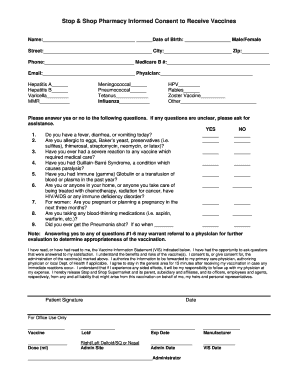
Get Stop And Shop Vaccine Consent Form
How it works
-

Open form follow the instructions
-

Easily sign the form with your finger
-

Send filled & signed form or save
How to fill out the Stop And Shop Vaccine Consent Form online
Filling out the Stop And Shop Vaccine Consent Form online is a straightforward process that helps facilitate vaccination procedures. This guide provides a detailed overview of each section to ensure users complete the form accurately and efficiently.
Follow the steps to complete your vaccine consent form
- Click ‘Get Form’ button to access the Stop And Shop Vaccine Consent Form and open it in your preferred editor.
- Begin by entering your name in the designated field. Make sure to provide your full legal name as it appears on your identification.
- Next, fill in your date of birth by selecting the correct month, day, and year from the provided fields.
- Choose your gender by selecting either 'Male' or 'Female' from the options provided.
- Enter your street address, city, and zip code in the corresponding fields to ensure accurate contact information.
- Provide your phone number to facilitate communication if necessary, followed by your Medicare B number, if applicable.
- Input your email address for potential follow-up communication regarding your vaccination.
- Enter the name of your physician in the appropriate field to maintain a record of your healthcare provider.
- Indicate the vaccines you wish to receive by marking the appropriate checkboxes next to each vaccine listed.
- Respond to the health-related questions by selecting 'Yes' or 'No' for each question listed, ensuring that you answer truthfully.
- Review the statement regarding the Vaccine Information Statement and check the box to indicate your understanding and consent.
- Sign the form in the designated 'Patient Signature' field and input the date of your signature.
- Upon completing the form, you may save your changes, download it for your records, print it out, or share it with relevant parties as needed.
Complete your Stop And Shop Vaccine Consent Form online today to ensure a smooth vaccination process.
Related links form
What are the risks of SPIKEVAX? Trouble breathing. Swelling of your face and throat. A fast heartbeat. A rash all over your body. Dizziness and weakness.