Loading
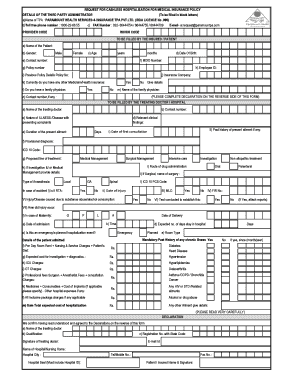
Get Irda Claim Form(pre-auth) - Paramount Health Services
How it works
-

Open form follow the instructions
-

Easily sign the form with your finger
-

Send filled & signed form or save
How to fill out the IRDA Claim Form(Pre-Auth) - Paramount Health Services online
This guide provides a comprehensive overview of how to fill out the IRDA Claim Form(Pre-Auth) for Paramount Health Services online. We will walk you through each section and field of the form to ensure that you can complete it accurately and efficiently.
Follow the steps to complete your IRDA Claim Form(Pre-Auth) online:
- Click ‘Get Form’ button to obtain the form and open it for completion.
- Fill in the details of the third party administrator (TPA) at the top of the form, including the name, contact number, and email address.
- Provide your personal details in the 'To be filled by the insured/patient' section including name, age, gender, contact number, and date of birth.
- Input your MDID number, policy number, employee ID, and previous policy details if applicable.
- Indicate whether you have any other health insurance and if you have a family physician; include their details if applicable.
- Complete the section for your treating doctor, including their name, contact number, relevant clinical findings, and nature of illness or disease.
- Describe your current ailment's duration, past history, and include the date of first consultation.
- For the proposed line of treatment, check the appropriate options for medical management, surgical management, or investigation as relevant.
- If the treatment involves investigations, provide details regarding drug administration and any surgical procedures.
- In case of an accident, answer questions related to road traffic accident (RTA) and any tests conducted.
- If applicable, fill in maternity details including date of admission, expected number of days of stay, and room type.
- Outline the expected costs related to hospitalization, including room rent, ICU charges, professional fees, and any other relevant expenses.
- Review and complete the declaration section including signature from the treating doctor and hospital representative.
- Save changes, and choose options to download, print, or share the completed form as required.
Complete your IRDA Claim Form(Pre-Auth) online today for a seamless claims experience.
Helpline No. & Email ID Helpline No. : +91 22 666 20 808. Toll free No. : 1800 22 66 55. Senior Citizen Helpline No. : +91 22 666 29 813. Cashless Authorization Email Id : al.request@paramounttpa.com. Email Us : contact.phs@paramounttpa.com. Claim Intimation Email Id : claim.intimation@paramounttpa.com.
Industry-leading security and compliance
US Legal Forms protects your data by complying with industry-specific security standards.
-
In businnes since 199725+ years providing professional legal documents.
-
Accredited businessGuarantees that a business meets BBB accreditation standards in the US and Canada.
-
Secured by BraintreeValidated Level 1 PCI DSS compliant payment gateway that accepts most major credit and debit card brands from across the globe.