Loading
Get Daycare Timesheet
How it works
-

Open form follow the instructions
-

Easily sign the form with your finger
-

Send filled & signed form or save
How to fill out the Daycare Timesheet online
Filling out the Daycare Timesheet online is an essential step for ensuring accurate documentation of childcare hours. This guide provides straightforward instructions for successfully completing each section of the form, tailored to meet your needs.
Follow the steps to complete the Daycare Timesheet online.
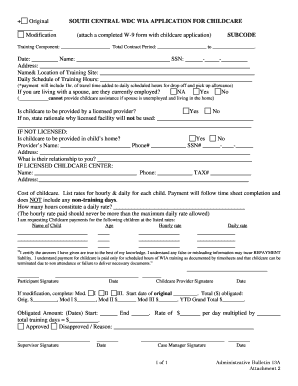
- Click ‘Get Form’ button to access the Daycare Timesheet and open it in your preferred document editor.
- Begin by filling in the date and your name at the top of the form. Ensure that you include your social security number and current address for accurate identification.
- Provide the name and location of the training site along with the daily schedule of training hours. Note that payment includes one hour of travel time added for drop-off and pick-up allowances.
- Indicate whether your spouse is currently employed by selecting 'Yes' or 'No.' If you select 'No,' be aware that assistance cannot be provided if your spouse is unemployed.
- Specify if childcare will be provided by a licensed provider. If the answer is 'No,' explain the rationale in the provided space.
- If using a licensed provider, provide their name, phone number, tax identification number, and address. If not licensed, enter the provider's name and relationship to you.
- List the hourly and daily rates for each child as well as the number of hours that constitute a daily rate. Make sure the hourly rate does not exceed the maximum daily rate allowed.
- Confirm your certification by signing and dating the form. Remember, any false information may lead to repayment liability.
- Complete the section for modifications if applicable, detailing any necessary modifications and total obligated amounts.
- Finally, secure signatures from both the participant and childcare provider. Save your changes, download a copy, and print or share the form as needed.
Take the first step towards completing your documentation by filling out the Daycare Timesheet online today.
Filling timesheets on a basic level is the same for both paper timesheets and software timesheets. They include the employee's name and surname, dates of work, active projects, and working hours. Both variants should get approved by a manager before they are included in an invoice.
Industry-leading security and compliance
US Legal Forms protects your data by complying with industry-specific security standards.
-
In businnes since 199725+ years providing professional legal documents.
-
Accredited businessGuarantees that a business meets BBB accreditation standards in the US and Canada.
-
Secured by BraintreeValidated Level 1 PCI DSS compliant payment gateway that accepts most major credit and debit card brands from across the globe.