Loading
Get Ca Ba Fev 100 2020-2026
How it works
-

Open form follow the instructions
-

Easily sign the form with your finger
-

Send filled & signed form or save
How to fill out the CA BA FEV 100 online
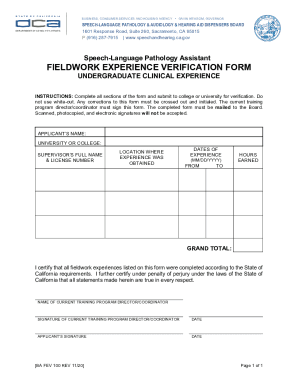
Completing the CA BA FEV 100 form online is a straightforward process designed to verify your fieldwork experience as a speech-language pathology assistant. This guide will walk you through each section of the form, providing clear instructions to ensure your submission is accurate and complete.
Follow the steps to successfully fill out the CA BA FEV 100 online.
- Click the ‘Get Form’ button to access the CA BA FEV 100 form. This will allow you to open the document within your preferred online editing tool.
- Begin by entering your full name in the 'Applicant’s Name' field. Ensure this matches your official identification documents for consistency.
- In the 'Supervisor’s Full Name & License Number' field, provide the complete name of your supervisor alongside their professional license number. This information must be accurate to validate your experience.
- Detail the 'Location Where Experience Was Obtained' by stating the address or name of the facility where you completed your fieldwork. Make sure this information is correct to ensure proper acknowledgment.
- Fill in the 'Dates of Experience' section by indicating the start date (FROM) and end date (TO) using the MM/DD/YYYY format. Verify that these dates reflect the entire duration of your experience.
- Record the total hours earned throughout your fieldwork in the 'Hours Earned' section. Calculate this accurately, as it is essential for your application.
- Review the certification statement carefully. This section confirms that you completed the experiences in accordance with California requirements.
- Have the current training program director or coordinator complete their section by signing and dating the form, as this is necessary for verification.
- After completion, save your changes, download a copy of the form, and print it for mailing. Ensure to send the original signed document to the Board, as scanned or electronic signatures are not accepted.
Begin your online form filling experience today to ensure your CA BA FEV 100 is accurately completed and submitted.