Loading
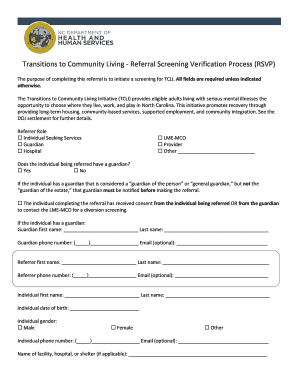
Get Nc Dhhs Transitions To Community Living - Referral Screening Verification Process (rsvp)
How it works
-

Open form follow the instructions
-

Easily sign the form with your finger
-

Send filled & signed form or save
How to fill out the NC DHHS Transitions To Community Living - Referral Screening Verification Process (RSVP) online
Completing the NC DHHS Transitions To Community Living - Referral Screening Verification Process (RSVP) is an important step in accessing community-based services for individuals with serious mental illnesses. This guide will provide you with detailed instructions to effectively fill out the form online.
Follow the steps to complete the RSVP form online.
- Press the ‘Get Form’ button to access the RSVP form and open it in your online document editor.
- Identify your role as a referrer by selecting the appropriate option from the following: Individual Seeking Services, Guardian, Hospital, LME-MCO, Provider, or Other. This helps establish your relationship to the individual being referred.
- Indicate whether the individual being referred has a guardian by selecting 'Yes' or 'No'. If the individual has a guardian, ensure that consent has been obtained to proceed with the referral.
- If applicable, provide the details of the guardian, including their first name, last name, phone number, and email address.
- Complete your information as the referrer, providing your first name, last name, phone number, and email address.
- Fill in the details of the individual being referred, including their first name, last name, date of birth, gender, phone number, and email address.
- Specify the name of the facility, hospital, or shelter where the individual is currently located, if applicable.
- Select the referral location type from options such as Facility, State psychiatric hospital, Community hospital, Homeless, Incarcerated, With family/friends, or Residing in private residence.
- Provide the referral location address, including city, state, and ZIP code, if applicable.
- Select the reasons for the referral from categories such as Mental health, Substance use, Traumatic brain injury, Intellectual/development disability, Medical, or Personal care services.
- Indicate any potential mental health diagnoses relevant to the individual's case by checking the applicable conditions.
- Determine the individual's Medicaid eligibility status by selecting the appropriate option.
- If known, provide the individual's Medicaid number or the last four digits of their Social Security number, along with their Medicaid County or county of residence.
- Include any additional information that may assist in the screening process, such as past hospitalizations or medical conditions.
- Provide your contact information for further communication, and list the collateral documents that can be gathered for the screening.
- After completing all fields, save the changes, and choose to download, print, or share the form as needed.
Now that you have a complete guide, start filling out the NC DHHS RSVP form online to ensure a thorough screening process.
Related links form
Teacher Cancellation Low Income (TCLI) Directory. Federal Student Aid.
Industry-leading security and compliance
US Legal Forms protects your data by complying with industry-specific security standards.
-
In businnes since 199725+ years providing professional legal documents.
-
Accredited businessGuarantees that a business meets BBB accreditation standards in the US and Canada.
-
Secured by BraintreeValidated Level 1 PCI DSS compliant payment gateway that accepts most major credit and debit card brands from across the globe.