Loading
Get Pump Installation And Production Equipment Test Report
How it works
-

Open form follow the instructions
-

Easily sign the form with your finger
-

Send filled & signed form or save
How to fill out the PUMP INSTALLATION AND PRODUCTION EQUIPMENT TEST REPORT online
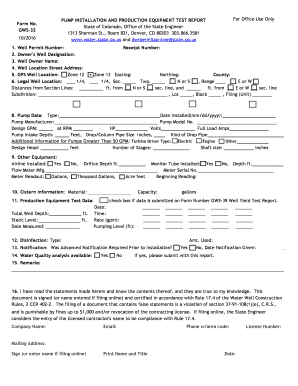
Filling out the Pump Installation and Production Equipment Test Report accurately is essential for compliance with state regulations. This guide will walk you through the necessary steps to complete the report online, ensuring that all required information is submitted correctly.
Follow the steps to complete your report efficiently.
- Click ‘Get Form’ button to obtain the form and open it in the editor.
- Complete the well permit number and receipt number fields, ensuring you have the correct identification for your submission.
- Provide the owner’s well designation to appropriately identify the well.
- Fill in the well owner name to identify the individual responsible for the well.
- Enter the street address where the well is located, including the city and state.
- Input the GPS location of the well, selecting the appropriate UTM zone (12 or 13) based on the well's location.
- Complete the legal description of the well location, including subdivision, lot, block, and other identifiers as applicable.
- Check the installation type performed: initial pump installation, replacement pump, change in depth only, or repair.
- Fill out the pump data section, including the type of pump, installation date, manufacturer, model number, design GPM, HP, volts, and pump intake depth.
- Provide additional information if the pump is greater than 50 GPM, specifying turbine driver type and design head.
- List other equipment installed, such as airlines and flow meters, ensuring that all relevant data is included.
- For cisterns connected to the water well supply system, provide the material and capacity details.
- Record production equipment test data, including total well depth, static level, date measured, and rate of flow.
- Indicate the type and amount of disinfection used in the installation process.
- Note whether advanced notification was required before installation and provide the notification date if necessary.
- Indicate if a water quality analysis was available and submit any reports with the application.
- Use the remarks section to note any additional comments or issues encountered during installation.
- Complete your personal and company information as required, including the contractor's license number.
- Sign the form or enter your name if filing online, certifying the information as true and accurate.
- Finally, review all entries for accuracy, then save your changes, and proceed to download, print, or share the report.
Complete your documents online to ensure efficiency and compliance.
Pumping tests are performed during aquifer characterization to gain conceptual understanding about the system through diagnostic plots and to estimate hydraulic properties. Recovery tests consist of measuring head response in observation and/or pumping wells after pumping termination.