Loading
Get Ct Wcc 43 2021-2026
How it works
-

Open form follow the instructions
-

Easily sign the form with your finger
-

Send filled & signed form or save
How to fill out the CT WCC 43 online
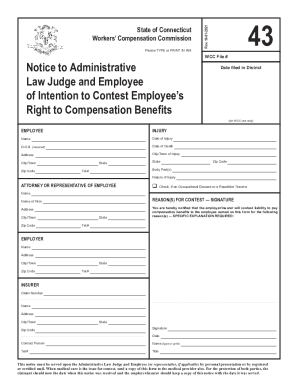
The CT WCC 43 form is an essential document for notifying both the Administrative Law Judge and the employee of the employer's intention to contest the employee's right to compensation benefits. This guide will provide you with straightforward, step-by-step instructions for completing the form accurately online.
Follow the steps to complete the CT WCC 43 form efficiently.
- Press the ‘Get Form’ button to access the CT WCC 43 form and open it in your editing interface.
- Fill in the 'WCC File #' field, which is for WCC use only. This will typically be assigned by the Workers' Compensation Commission.
- Enter the 'Date filed in District' to indicate when the form is submitted.
- In the 'EMPLOYEE' section, provide the employee's full name, date of injury, date of birth (required), and, if applicable, the date of death. Also, include the employee's complete address, city or town of injury, state, and zip code.
- Specify the body part(s) affected by the injury by filling in the appropriate section.
- Mention the nature of the injury in the given field, being as descriptive as possible.
- If the employee has legal representation, fill out the 'ATTORNEY OR REPRESENTATIVE OF EMPLOYEE' section. Include their name, address, city or town, state, and zip code. Check the box if the case involves an occupational disease or repetitive trauma.
- In the 'REASON(S) FOR CONTEST — SIGNATURE' area, enter the name of the law firm or representative, their contact information, and provide a specific explanation of the reasons for contesting liability for payment of benefits.
- Complete the 'EMPLOYER' section with the employer's name, address, city or town, state, zip code, and telephone number.
- Fill in the 'INSURER' section, including the claim number, insurer's name, address, city or town, state, and zip code.
- Sign and date the form in the designated area. Include the name of the contact person, their title, and contact telephone number.
- Once you have completed all required fields, save your changes. You can then download, print, or share the completed CT WCC 43 form as needed.
Complete the CT WCC 43 form online today to ensure timely processing of your notice.