Loading
Get U013
How it works
-

Open form follow the instructions
-

Easily sign the form with your finger
-

Send filled & signed form or save
How to fill out the U013 online
The U013 form is used for coordinating social security systems and managing monthly follow-up tasks. This guide provides a step-by-step approach to filling out the U013 online, ensuring that all necessary information is accurately submitted.
Follow the steps to accurately complete the U013 form online.
- Press the ‘Get Form’ button to obtain the U013 form and open it in the editor.
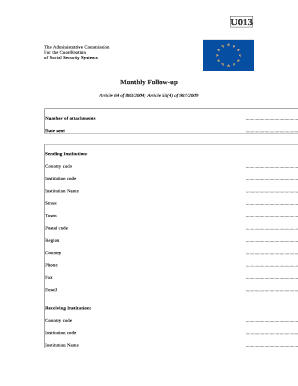
- Begin by entering the number of attachments you are including with the form in the designated field. This provides clarity on additional documents submitted.
- Date sent: Fill in the current date when the form is submitted.
- In the 'Sending Institution' section, enter the required details including country code, institution code, institution name, street address, town, postal code, region, country, phone number, fax number, and email address.
- Proceed to the 'Receiving Institution' section and repeat the process by filling out country code, institution code, institution name, street address, town, postal code, region, country, phone number, fax number, and email address.
- Next, in the 'Case Numbers' section, provide the case numbers for both the sending and receiving institutions in the respective fields.
- In the 'Person' section, accurately fill out the information including family name, forenames, birth date, sex, family name at birth, and forenames at birth of the individual concerned.
- If you have the Personal Identification Number of the person, check the appropriate box and fill in both personal identification numbers in the relevant fields.
- If you do not have the Personal Identification Number, check the alternative box and provide the place of birth, father’s family name at birth, mother’s family name at birth, forename of the father, and forename of the mother.
- Proceed to provide the nationality of the individual in the designated field.
- Indicate whether the person is registered by checking 'Yes' or 'No.'
- Finally, include the signature of the sending institution and the date, ensuring that the stamp, if applicable, is placed in the designated area.
- After completing all sections of the U013 form, you can save your changes, download a copy, print it out, or share it as needed.
Complete your U013 form online today to ensure efficient processing.