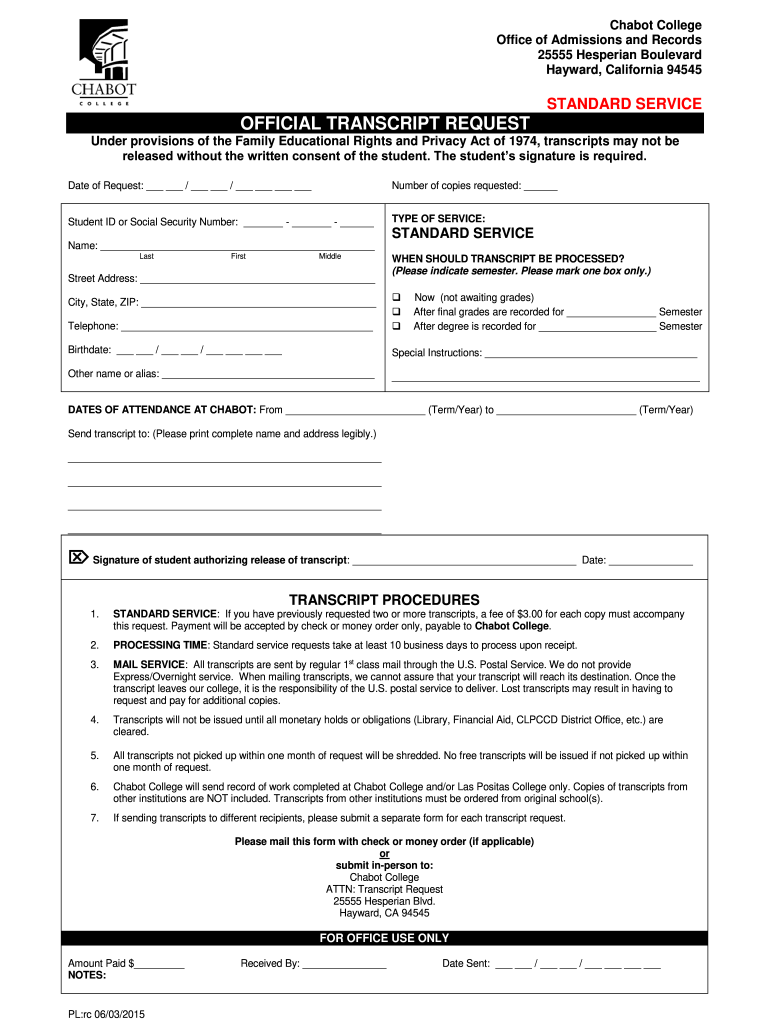
Nd Privacy Act of 1974, transcripts may not be released without the written consent of the student. The student’s signature is required. Date of Request: ___ ___ / ___ ___ / ___ ___ ___ ___ Number of copies requested: ______ Student ID or Social Security Number: _______ - _______ - ______ TYPE OF SERVICE: STANDARD SERVICE Name: _________________________________________________ Last First Middle Street Address: __________________________________________ WHEN SHOULD TRANSCRIPT BE PROCESS.
Loading

Open form follow the instructions

Easily sign the form with your finger

Send filled & signed form or save
How to fill out the Chabot College Official Transcript Request online
Filling out the Chabot College Official Transcript Request online is an essential process for students wishing to obtain their academic transcripts. This guide provides clear, step-by-step instructions to help users navigate the form with ease and confidence.
Follow the steps to successfully complete the transcript request form.
- Click ‘Get Form’ button to access the transcript request form and open it in your preferred digital editor.
- Fill in the date of your request in the designated area. Ensure you use the correct format, including day, month, and year.
- Indicate the number of copies of the transcript you are requesting by filling in the appropriate number in the specified field.
- Enter your Student ID or Social Security Number in the provided space. This information is critical for verifying your identity.
- In the 'type of service' section, ensure that 'standard service' is selected, as it is the only option available.
- Provide your full name in the 'Name' section, ensuring that it is clearly legible, with your last name first, followed by your first and middle names.
- Fill out your complete street address, including city, state, and ZIP code, to ensure proper delivery of your transcript.
- Choose when you would like the transcript to be processed by marking one of the available options relevant to your needs.
- Provide your birthdate in the specified format, ensuring accuracy for identification purposes.
- If applicable, enter any special instructions regarding your transcript request in the designated section.
- If you have used a different name or alias, provide that information to assist in locating your records.
- Provide the dates of your attendance at Chabot College by filling in the appropriate term and year for both start and end dates.
- Indicate the complete name and address of the party to whom the transcript should be sent, ensuring correct spellings and details.
- Sign the form to authorize the release of your transcript and date your signature accurately.
- Once all sections are filled out, review the form for any errors or omissions before saving your changes or downloading the completed form.
Complete your Chabot College Official Transcript Request online today to ensure prompt processing of your academic records.
Experience a faster way to fill out and sign forms on the web. Access the most extensive library of templates available.
Related content
Official Transcript. TRANSFER. GE Certification · Transfer Workshops. GRADUATION...
Please contact the college(s) you previously attended, and request that official...
The Scientific Blackpill is about understanding the nature of human social and sexual...
Get answers to your most pressing questions about US Legal Forms API.
What to say when requesting transcripts?
When requesting transcripts, it is best to be straightforward and concise. You could say, 'I would like to request my official transcript from Chabot College for further education applications.' Don’t forget to include your identifying information to ensure your request is linked to your student records.
How to write an email requesting for a transcript?
In your email requesting a transcript, start with a polite greeting, then state your request clearly. For example, you might write, 'I am writing to request my official transcript from Chabot College.' Include your full name, student ID, and any other information that may assist in processing your request quickly.
What do I put in attention on transcript request?
When filling out your transcript request, you should address it to the Admissions Office. Ensure that your request specifies 'Attn: Transcript Processing'. This helps direct your request to the correct department, minimizing any chances of delays in receiving your official transcript.
How do I ask for a transcript request?
To begin a transcript request, you should submit the 'Chabot College Official Transcript Request' form. Include all needed information, such as your name, student ID, and the address where you want the transcript sent. By providing complete details, you can help ensure prompt processing of your request.
Can official transcripts be sent electronically?
Yes, official transcripts can be sent electronically upon request. When filling out the 'Chabot College Official Transcript Request' form, choose the option for electronic delivery if available. This is a convenient method that allows you to receive your transcripts quickly and securely.
How do I email Chabot College Admissions Office?
You can email the Chabot College Admissions Office at admissions@chabotcollege. In your email, include a clear subject line, such as 'Transcript Request', and provide your full name, student ID, and any relevant details about your request. This will help the Admissions Office assist you more efficiently.
How do I ask for transcripts of records?
To obtain transcripts of your records, you should follow the procedure outlined for the 'Chabot College Official Transcript Request'. Start by accessing the official request form online. After completing the form, make sure to specify that you need transcripts of your records, so the staff can process your request accurately.
How do I ask for an official transcript?
To request your official transcript from Chabot College, you need to complete the 'Chabot College Official Transcript Request' form. You can find this form on the college's website or visit the Admissions Office. Once you fill it out, submit it either in person or electronically, ensuring you provide all necessary details to avoid any delays.
How long does it take to get a transcript by mail?
If you request a transcript by mail, expect it to take anywhere from five to ten business days for delivery, depending on your location. After the college processes your Chabot College Official Transcript Request, they will send it through the postal service. Tracking options may be available, so inquire if it's crucial for you to monitor its progress.
How long does it take to get a copy of your college transcript?
After you submit your Chabot College Official Transcript Request, it generally takes a few days to receive a physical copy. If you opt for an electronic version, it may arrive even sooner. Always keep track of your request status through the college's official channels.
Use professional pre-built templates to fill in and sign documents online faster. Get access to thousands of forms.
If you believe that this page should be taken down, please follow our DMCA take down process here.
This form is available in several versions. Select the version you need from the drop-down list below.