Loading
Get Axis Corporate Internet Banking
How it works
-

Open form follow the instructions
-

Easily sign the form with your finger
-

Send filled & signed form or save
How to fill out the Axis Corporate Internet Banking online
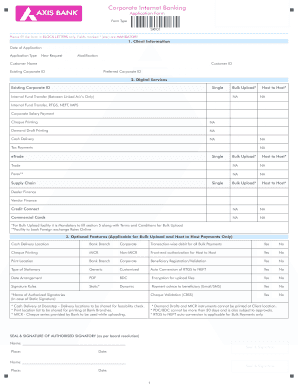
Filling out the Axis Corporate Internet Banking application form is a vital step for organizations looking to manage their banking needs efficiently online. This guide will walk you through the essential components of the form, providing clear and actionable steps to ensure a seamless completion process.
Follow the steps to successfully complete the Axis Corporate Internet Banking application form.
- Click ‘Get Form’ button to obtain the application form and open it in your document editor.
- Enter the date of the application in the designated field in the format DD/MM. Select the application type: New Request or Modification, marking it clearly as applicable.
- Fill in the client information section, including the Customer Name and Customer ID, ensuring that all mandatory fields marked with an asterisk (*) are filled in block letters.
- In the digital services section, specify your existing Corporate ID if applicable. Select one or multiple service options like Internal Fund Transfer, Corporate Salary Payment, or Demand Draft Printing. For options like Bulk Upload, be sure to fill out section 5 along with the terms and conditions.
- If applicable, fill out the optional features section regarding Bulk Uploads or Host to Host payments, clearly indicating your preferences for services such as Cash Delivery Location and Transaction-wise debit features.
- Complete the user profile section by entering details for each proposed user, including their login ID, mobile number, and mode of authorization. Ensure all fields marked with an asterisk are completed.
- Review and complete the authorization matrix section, ensuring that all mandatory fields are addressed thoroughly, particularly relating to digital services.
- Prepare to fill in the services charges section, especially if you are applying for bulk upload or host payments, detailing the payment modes you will need.
- In the declaration section, confirm that you are empowered to authorize users and that the details provided are correct. Complete this section with the signatures and seals of authorized signatories as required.
- Finally, review the form for completeness and accuracy. Once validated, you can save changes, download, print, or share the completed form as required.
Begin completing the Axis Corporate Internet Banking application form online today to streamline your corporate banking experience.
Related links form
Your CIN number can be found on various documents, including the certificate of incorporation issued by the registrar of companies, your Memorandum of association (MOA), and articles of association (AOA). Additionally, you can access your CIN number online through the Ministry of Corporate Affairs (MCA) portal.