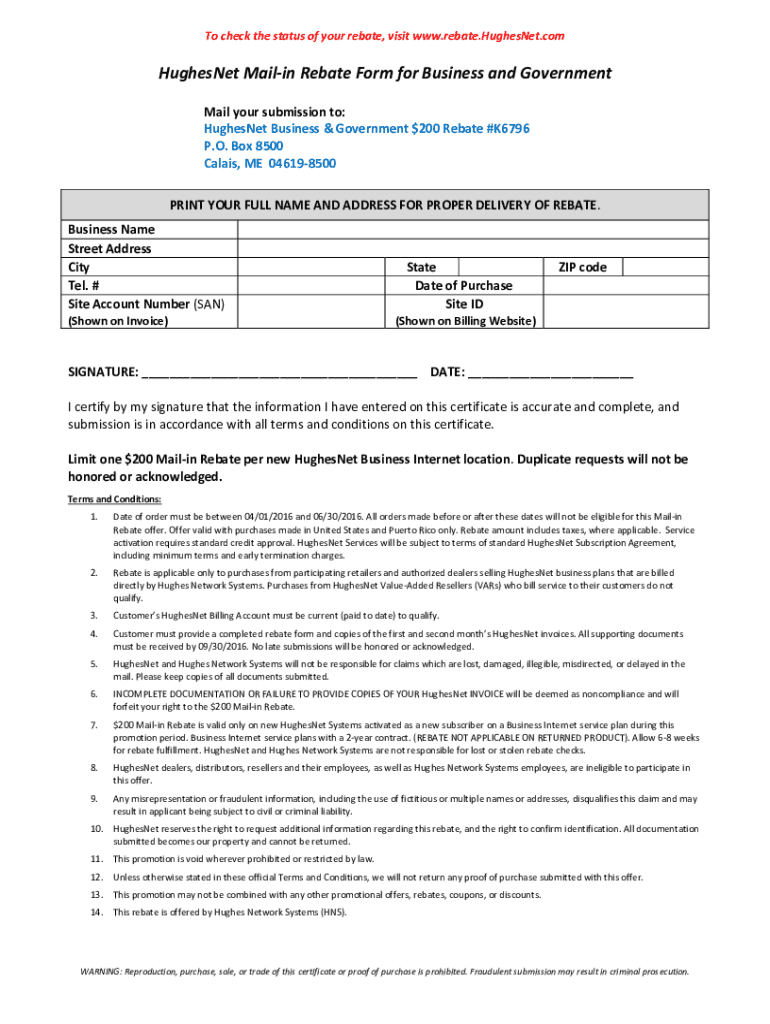
To check the status of your rebate, visit www.rebate.HughesNet.com HughesNet Rebate for Business and Government Get a $200 MailIn Rebate When You Buy HughesNet for your Business or Government Agency!.

Open form follow the instructions

Easily sign the form with your finger

Send filled & signed form or save
How to fill out the Hughesnet 200 Rebate online
This guide provides a comprehensive, step-by-step approach to completing the Hughesnet 200 Rebate form online. Following these instructions will ensure that you correctly fill out the necessary information to claim your rebate.
Follow the steps to successfully submit your rebate.
- Press the ‘Get Form’ button to access the rebate form and open it in your preferred editor.
- Begin filling in the required fields. Start with printing your full name and address to ensure proper delivery.
- Enter the business name, street address, city, state, and zip code.
- Provide your telephone number and Site Account Number (SAN), which can be found on your invoice.
- Indicate the date of purchase and Site ID as shown on your billing website.
- Sign and date the form, certifying that the information provided is accurate and complete.
- Ensure all necessary documents, such as your first two HughesNet invoices, are printed and included.
- Mail your completed rebate form and invoices to the provided address. Remember that all submissions must be received by September 30, 2016.
- Keep a copy of the rebate form and invoices for your records.
Complete your rebate submission online today and take advantage of this offer.
Experience a faster way to fill out and sign forms on the web. Access the most extensive library of templates available.
Related content
I have been placed on the 200 Mbps download speed and have used multiple speed test sites...
May 13, 2021 — Find out if you or a member of your household qualify for a discount on...
Dec 29, 2012 — HughesNet Business Solutions Business Internet Put the power of broadband...
Get answers to your most pressing questions about US Legal Forms API.
How do I claim my HughesNet rebate?
Get the free hughesnet rebate form If qualifying, will be mailed a mailer with a confirmation email within 2 weeks after qualifying. Must be able to provide valid email address with request and mailer with confirmation email. The rebate amount can't be taken as cash.
How do I get my $300 rebate from HughesNet?
Adhere to the instructions below to complete Hughesnet rebate form online easily and quickly: Sign in to your account. Sign up with your credentials or create a free account to try the product before upgrading the subscription. Upload a document. ... Edit Hughesnet rebate form. ... Get the Hughesnet rebate form completed.
What time is HughesNet free?
The HughesNet Bonus Zone (2am-8am) is available to all HughesNet customers automatically. You don't have to activate or pay anything to take advantage of this additional data. The Bonus Zone (2am-8am) hours are from 2am to 8am, your local time.
What is the HughesNet reward?
Globalcom Satellite Communications offers our HughesNet™ satellite internet customers a $100 referral bonus when you refer a new customer that orders a HughesNet satellite internet system. Both the original customer and the referred customer must order directly from Globalcom Satellite Communications.
What do you have to return when you cancel HughesNet?
If you cancel after the end of your 24-month term commitment: You must return your HughesNet modem, radio, and power supply in good condition within 45 days from the time of termination or be charged a $300 Unreturned Equipment Fee ($100 for the modem and power supply and $200 for the radio transmitter).
What happens when you run out of data on HughesNet?
What happens when I use up all of my Plan Data? With HughesNet, all service plans feature No Hard Data Limits. If you exceed your plan data, you'll stay connected. However, during high-traffic periods, you may experience reduced speeds.
What time is the HughesNet bonus?
The HughesNet Bonus Zone hours are from 2-8 a.m. local time. When you need to download updates, games, movies, or any large file, schedule the download to start during the HughesNet Bonus Zone hours. The HughesNet Bonus Zone might be an attractive option for users who find themselves downloading large files.
Use professional pre-built templates to fill in and sign documents online faster. Get access to thousands of forms.
If you believe that this page should be taken down, please follow our DMCA take down process here.