Get Soplay
How it works
-

Open form follow the instructions
-

Easily sign the form with your finger
-

Send filled & signed form or save
How to use or fill out the Soplay online
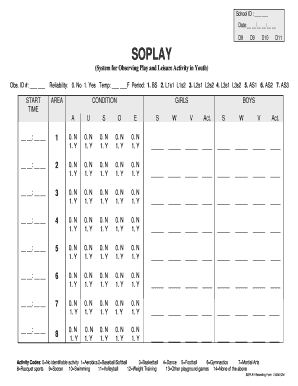
This guide provides clear and detailed instructions on how to fill out the Soplay online, ensuring users can complete the form accurately and efficiently. The Soplay is designed to enhance the observation of play and leisure activities in youth, making it essential for effective documentation and analysis.
Follow the steps to successfully fill out the Soplay form online.
- Press the ‘Get Form’ button to access the Soplay document and open it in the appropriate editor.
- Fill in the School ID section with the relevant identification information.
- Enter the date in the format MM/DD/YYYY to ensure proper record-keeping.
- In the Obs. ID # field, provide the unique observation identification number assigned to this assessment.
- Record the start time in the designated hours and minutes section, ensuring accuracy for time tracking.
- Complete the Reliability section by indicating the appropriate response (0 for No, 1 for Yes). Ensure the temperature is noted in Fahrenheit.
- Choose the period by marking the relevant option from the provided list. Each option corresponds to a specific observation period.
- In the AREA section, number each area observed from 1 to 8, as applicable.
- Indicate the conditions of the participants by filling in the GIRLS and BOYS sections with the corresponding codes.
- For activity observations, record responses for each activity listed, using '0' for No and '1' for Yes, based on the observed activities.
- Lastly, users have the option to save changes, download, print, or share the completed form as required.
Complete your Soplay document online today to enhance your observation capabilities.
Related links form
0:00 1:20 How to SoPlayer app on iPhone? - YouTube YouTube Start of suggested clip End of suggested clip Right then you have this app. And there you have it so just tap get and confirm this touch id of iceMoreRight then you have this app. And there you have it so just tap get and confirm this touch id of ice id or just apple id password. So there you have it this is an ru.