Loading
Get After School Activity Asa Permission Slip - Portal Norwalkps
How it works
-

Open form follow the instructions
-

Easily sign the form with your finger
-

Send filled & signed form or save
How to fill out the After School Activity ASA Permission Slip - Portal Norwalkps online
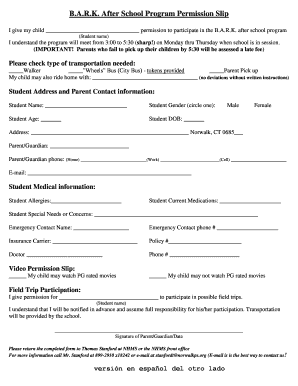
Filling out the After School Activity ASA Permission Slip is a straightforward process that enables your child to participate in the B.A.R.K. after school program. This guide will provide you with step-by-step instructions to complete the form online effectively.
Follow the steps to complete the permission slip.
- Locate and click the ‘Get Form’ button to acquire the After School Activity ASA Permission Slip and launch it in your preferred online editor.
- Begin by entering your child's name in the designated field to provide permission for their participation in the B.A.R.K. after school program. Ensure accuracy as this Name will represent your child in the program.
- Review the schedule specified in the form, noting that the program runs from 3:00 to 5:30 PM, Monday through Thursday. Acknowledge the importance of timely pick-up to avoid late fees.
- Indicate the type of transportation your child will use by checking the relevant box for 'Walker,' 'Wheels' Bus, or 'Parent Pick up.' If your child will accompany someone else, please provide that person's name with any required instructions.
- Fill out the student address and parent contact information. This includes the student's name, age, date of birth, address, and the parent or guardian's contact details, including home, work, and cell phone numbers, as well as email.
- Complete the student medical information section by listing any allergies, current medications, and any special needs or concerns that may be relevant for program participation.
- Provide an emergency contact name and phone number. This person will be contacted in case of emergencies when your child is under the program's care.
- Indicate your child's permission regarding viewing PG-rated movies by checking either option provided.
- For field trip participation, fill in the name of your child and acknowledge that you will be responsible for their participation, noting that transportation will be arranged by the program.
- At the end of the form, ensure to provide your signature and the date to validate the permission slip. Double-check all information entered for accuracy.
- Once completed, you can save changes, download the form for your records, print it out, or share it as necessary according to the provided submission instructions.
Take the first step in securing your child's spot by completing the permission slip online today.
Industry-leading security and compliance
US Legal Forms protects your data by complying with industry-specific security standards.
-
In businnes since 199725+ years providing professional legal documents.
-
Accredited businessGuarantees that a business meets BBB accreditation standards in the US and Canada.
-
Secured by BraintreeValidated Level 1 PCI DSS compliant payment gateway that accepts most major credit and debit card brands from across the globe.