We use cookies to improve security, personalize the user experience, enhance our marketing activities (including cooperating with our marketing partners) and for other business use.
Click "here" to read our Cookie Policy. By clicking "Accept" you agree to the use of cookies. Read less
Read more
Accept
Loading
Form preview
  • US Legal Forms
  • Form Library
  • Executive Forms
  • Executive Department USDA Forms
  • Usda Incident/project Medical Emergency Evacuation Plan User Guide 2016

Get Usda Incident/project Medical Emergency Evacuation Plan User Guide 2016-2025

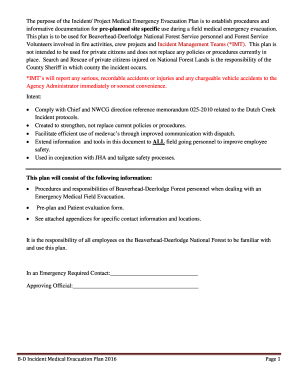
INCIDENT/PROJECT MEDICAL EMERGENCY EVACUATION PLANMEEPUSER GUIDE 2016 Incident/Project Medical Emergency Evacuation Plan BeaverheadDeerlodge NFThe purpose of the Incident/ Project Medical Emergency.

How it works

  1. Open form

    Open form follow the instructions

  2. Easily sign form

    Easily sign the form with your finger

  3. Share form

    Send filled & signed form or save

How to fill out the USDA Incident/Project Medical Emergency Evacuation Plan User Guide online

The USDA Incident/Project Medical Emergency Evacuation Plan User Guide is designed to assist users in managing medical emergencies effectively in field operations. This guide provides step-by-step instructions on how to fill out the form online, ensuring that all necessary information is accurately documented.

Follow the steps to successfully complete the evacuation plan form:

  1. Click ‘Get Form’ button to obtain the form and open it in the editor.
  2. Begin by filling out the Project Name at the top of the form. Ensure that the project title accurately reflects the activities being conducted.
  3. In the Frequency section, indicate the radio frequencies to be used during the project, including the Crew Leader/Incident Commander’s name and the relevant communication details.
  4. Provide the Project Location using Latitude and Longitude coordinates (WGS84 Datum). If necessary, include the legal land description to ensure clarity on where the project is occurring.
  5. List potential helispots and extraction points. Each helispot should be accompanied by its legal location and any relevant road or trail numbers.
  6. Document the Medical Qualifications of Personnel involved in the project. Include names, their respective locations (latitude and longitude), and their medical qualifications.
  7. Complete the Communication Plan section. This includes detailing the radio communication channels, frequencies, and tones required for effective communication.
  8. If a medical emergency arises, follow the outlined procedures to ensure responder safety and appropriate actions are taken, starting from contacting Dillon Dispatch with essential information.
  9. At the end of the form, ensure you check all filled information for accuracy, and then save changes, download, print, or share the document as needed.

Complete your forms online now to ensure effective planning in case of a medical emergency during your project.

Get form

Experience a faster way to fill out and sign forms on the web. Access the most extensive library of templates available.
Get form

Related content

Emergency Response Manual - USDA APHIS
Emergency Response Manual. 11/2010-1. Emergency and Domestic Programs. Operational...
Learn more
NAHEMS Guidelines: Disposal - USDA APHIS
Well before an animal health emergency strikes, disposal personnel should use these...
Learn more
Regulatory Procedures Manual Chapter 7 - FDA
Appendix A FDA Food Recall/Action Initiation Process Flow/Timeline for Class ... RES User...
Learn more

Related links form

Nikkah Nama State Farm Insurance Business Proposal Weston Accident/Incident Report Form for Construction Sites Excel Credit Vessel Purchase Agreement

Questions & Answers

Get answers to your most pressing questions about US Legal Forms API.

Contact support

Building Evacuation Procedures Safely stop your work. Shut down equipment that could become unstable or present a hazard. ... Leave the building through the nearest door with an EXIT sign. Do not use elevators. ... Report to your designated assembly area. ... Wait for instructions from emergency responders.

It covers general categories of disabilities (mobility, visual, hearing, speech and cognitive impairments), and outlines the four elements of evacuation that occupants need in an emergency: notification, way finding, use of the way, and assistance.

How to Write an Emergency Evacuation Plan Step 1: Evaluate the Emergency. ... Step 2: Determine Exit Routes. ... Step 3: Identify Safe Areas. ... Step 4: Develop Evacuation Procedures. ... Step 5: Discuss with Employees. ... Step 6: Assign Responsibilities. ... Step 7: Conduct Training Exercises. ... Step 8: Review and Update the Plan as Needed.

4 Stages of Evacuation: Tactical Evacuation. The emergency does not allow for any warnings to prepare to evacuate. ... Evacuation Alert. People should be prepared to evacuate the area. ... Evacuation Order. People have been ordered to evacuate the area. ... Evacuation Rescind.

To develop an effective evacuation plan, employers should follow the 3 stages of evacuation in a fire: 'Stage 1': Immediate evacuation; 'Stage 2': Lateral evacuation; and. 'Stage 3': Partial evacuation.

10 Essential Elements of an Emergency Evacuation Plan Conditions requiring an evacuation. ... When to shelter-in-place rather than evacuate. ... A clear chain of command. ... Specific emergency evacuation plan procedures. ... Specific evacuation procedures for high-rise buildings. ... Procedures for assisting visitors and employees to evacuate.

1. What Includes in an Evacuation Plan Proper exit routes. Correct emergency contact details. Details of the shelter-in-place. Important evacuation plan symbols. Stairway location on each floor.

The following procedures shall be followed when someone discovers a fire in a building, regardless of how large the fire is: 1) Close the door to the room where the fire is located. ... 2) Activate the closest fire alarm system. ... 3) Phone 2111 to report the location of the fire. ... 4) Extinguish or Evacuate.

Get This Form Now!

Use professional pre-built templates to fill in and sign documents online faster. Get access to thousands of forms.
Get form
If you believe that this page should be taken down, please follow our DMCA take down processhere.

Industry-leading security and compliance

US Legal Forms protects your data by complying with industry-specific security standards.
  • In businnes since 1997
    25+ years providing professional legal documents.
  • Accredited business
    Guarantees that a business meets BBB accreditation standards in the US and Canada.
  • Secured by Braintree
    Validated Level 1 PCI DSS compliant payment gateway that accepts most major credit and debit card brands from across the globe.
Get USDA Incident/Project Medical Emergency Evacuation Plan User Guide
Get form
Form Packages
Adoption
Bankruptcy
Contractors
Divorce
Home Sales
Employment
Identity Theft
Incorporation
Landlord Tenant
Living Trust
Name Change
Personal Planning
Small Business
Wills & Estates
Packages A-Z
Form Categories
Affidavits
Bankruptcy
Bill of Sale
Corporate - LLC
Divorce
Employment
Identity Theft
Internet Technology
Landlord Tenant
Living Wills
Name Change
Power of Attorney
Real Estate
Small Estates
Wills
All Forms
Forms A-Z
Form Library
Customer Service
Terms of Service
Privacy Notice
Legal Hub
Content Takedown Policy
Bug Bounty Program
About Us
Help Portal
Legal Resources
Blog
Affiliates
Contact Us
Delete My Account
Site Map
Industries
Forms in Spanish
Localized Forms
State-specific Forms
Forms Kit
Legal Guides
Real Estate Handbook
All Guides
Prepared for You
Notarize
Incorporation services
Our Customers
For Consumers
For Small Business
For Attorneys
Our Sites
US Legal Forms
USLegal
FormsPass
pdfFiller
signNow
airSlate WorkFlow
DocHub
Instapage
Social Media
Call us now toll free:
+1 833 426 79 33
As seen in:
  • USA Today logo picture
  • CBC News logo picture
  • LA Times logo picture
  • The Washington Post logo picture
  • AP logo picture
  • Forbes logo picture
© Copyright 1997-2025
airSlate Legal Forms, Inc.
3720 Flowood Dr, Flowood, Mississippi 39232
Form Packages
Adoption
Bankruptcy
Contractors
Divorce
Home Sales
Employment
Identity Theft
Incorporation
Landlord Tenant
Living Trust
Name Change
Personal Planning
Small Business
Wills & Estates
Packages A-Z
Form Categories
Affidavits
Bankruptcy
Bill of Sale
Corporate - LLC
Divorce
Employment
Identity Theft
Internet Technology
Landlord Tenant
Living Wills
Name Change
Power of Attorney
Real Estate
Small Estates
Wills
All Forms
Forms A-Z
Form Library
Customer Service
Terms of Service
Privacy Notice
Legal Hub
Content Takedown Policy
Bug Bounty Program
About Us
Help Portal
Legal Resources
Blog
Affiliates
Contact Us
Delete My Account
Site Map
Industries
Forms in Spanish
Localized Forms
State-specific Forms
Forms Kit
Legal Guides
Real Estate Handbook
All Guides
Prepared for You
Notarize
Incorporation services
Our Customers
For Consumers
For Small Business
For Attorneys
Our Sites
US Legal Forms
USLegal
FormsPass
pdfFiller
signNow
airSlate WorkFlow
DocHub
Instapage
Social Media
Call us now toll free:
+1 833 426 79 33
As seen in:
  • USA Today logo picture
  • CBC News logo picture
  • LA Times logo picture
  • The Washington Post logo picture
  • AP logo picture
  • Forbes logo picture
© Copyright 1997-2025
airSlate Legal Forms, Inc.
3720 Flowood Dr, Flowood, Mississippi 39232