Loading
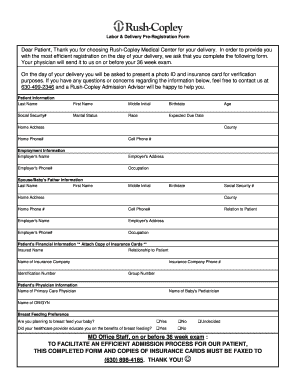
Get Printable Pre-registration Form - Rush-copley Medical Center
How it works
-

Open form follow the instructions
-

Easily sign the form with your finger
-

Send filled & signed form or save
How to fill out the Printable Pre-registration Form - Rush-Copley Medical Center online
Completing the Printable Pre-registration Form for Rush-Copley Medical Center is an important step towards ensuring a smooth admission process for your delivery. This guide will provide you with clear, step-by-step instructions to help you efficiently fill out the necessary information.
Follow the steps to complete the Pre-registration Form efficiently.
- Click ‘Get Form’ button to access the Printable Pre-registration Form and open it for editing.
- Begin by entering your personal information in the 'Patient Information' section. This includes your last name, first name, middle initial, birthdate, social security number, marital status, race, expected due date, age, home address, county, home phone number, and cell phone number.
- In the 'Employment Information' section, provide details about your employer including the employer's name, address, phone number, and your occupation.
- Next, complete the 'Spouse/Baby's Father Information' section. Enter the last name, first name, middle initial, birthdate, social security number, home address, county, home phone number, cell phone number, and relationship to the patient. Additionally, fill out the employer's name, address, phone number, and occupation.
- In the 'Patient's Financial Information' section, ensure you attach a copy of your insurance cards. Input the insured name, relationship to patient, name of the insurance company, identification number, group number, and the insurance company phone number.
- Complete the 'Patient's Physician Information' section by entering the names of your primary care physician, baby's pediatrician, and OB/GYN.
- Consider your breastfeeding preferences and select the appropriate response. Indicate whether you plan to breastfeed your baby and if your healthcare provider has educated you on the benefits of breastfeeding.
- Review all entered information to ensure accuracy. Once completed, save your changes. You can then download, print, or share the form as needed.
Ensure a seamless admission process by completing the Printable Pre-registration Form online today.
Appointments and medical records MyChart: For online prescription refills, test results and appointment scheduling for current patients, call (312) 563-6600 or log in to your MyChart account. Medical records: To request copies of your medical records, please call (312) 942-7262.