Loading
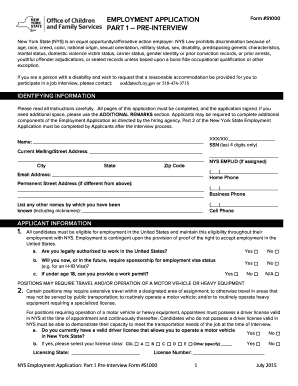
Get Nys S1000 Form Printable
How it works
-

Open form follow the instructions
-

Easily sign the form with your finger
-

Send filled & signed form or save
How to fill out the Nys S1000 Form Printable online
The Nys S1000 Form Printable is an essential document for individuals applying for employment with New York State. This guide provides clear, step-by-step instructions to help you effectively complete this form online, ensuring you understand each section and its requirements.
Follow the steps to successfully fill out the Nys S1000 Form Printable online.
- Press the ‘Get Form’ button to access the form and open it in your selected editing tool.
- Begin by entering your identifying information in the designated fields. This includes your name, current mailing address, email address, and contact numbers. Be sure to double-check that all information is accurate.
- Proceed to the applicant information section. Confirm your eligibility to work in the United States by answering the questions about your work authorization and whether you need sponsorship.
- Next, indicate if any position you are applying for requires travel or operation of a motor vehicle. Answer the questions regarding your valid driver license status, including any necessary license class or restrictions.
- If the position requires a professional license, complete the corresponding fields with your license details, including the name, number, and any applicable expiration dates.
- Furnish details about any relatives employed by the agency and your connections to any entity doing business with the agency, if applicable.
- Provide information regarding your job interests and availability to work. Specify the type of work desired, preferred locations, and your availability for different work schedules.
- In the education section, list your educational background, including schools attended and any degrees received.
- Complete the employment and experience section by detailing your work history, starting with the most recent position. Include your job title, duties, and reasons for leaving each past job.
- Fill out the professional references section with the names, relationships, and contact information of individuals who can attest to your qualifications.
- Use the additional remarks section if you need to provide any extra information or context.
- Finally, review the applicant affirmation section, sign the form, and date it. Ensure all fields are filled out completely before proceeding.
- Once you have filled out the form, you can save your changes, download a copy, print it, or share it as required.
Start completing your Nys S1000 Form Printable online today.
Table of Contents Prepare the Business Legally. Write a Clear Job Description. Consider Company Culture. Get in Front of Candidates. Review Applications. Interview and Screen Candidates. Extend an Offer. Onboarding Your New Employee.