Loading
Get Cop20a
How it works
-

Open form follow the instructions
-

Easily sign the form with your finger
-

Send filled & signed form or save
How to fill out the Cop20a online
The Cop20a form is an essential document used in Court of Protection proceedings. This guide provides clear instructions on how to accurately fill out this form online, ensuring you meet the necessary requirements.
Follow the steps to complete the Cop20a form online
- Click ‘Get Form’ button to obtain the Cop20a document and open it in the editor.
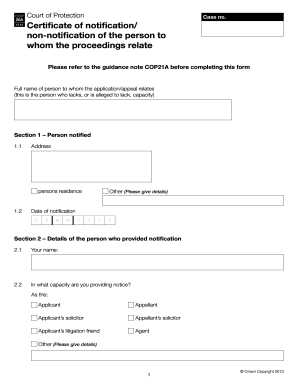
- Start by entering the full name of the person to whom the application or appeal relates in the designated field. This is the individual alleged to lack capacity.
- Proceed to Section 1 to provide the address of the person notified. Carefully fill in all relevant details.
- In Section 1.2, you will need to enter the date of notification using the provided format (DD/MM/YYYY).
- Move to Section 2, where you must input your name in the relevant field, and specify in what capacity you are providing notice (e.g., applicant, applicant’s solicitor, etc.).
- In Section 3, indicate the relevant notification statement by ticking the appropriate box that describes your situation, such as if an application form has been issued or withdrawn.
- If you have chosen non-notification in Section 4, describe your attempt to notify and explain why notification was not provided.
- Finally, in Section 5, complete the statement of truth by signing and dating the document. Also include your name and position or office held.
- Once all sections are accurately filled, you can save the changes, and download, print, or share the completed form as needed.
Complete your documents online today for a smooth filing experience.