We use cookies to improve security, personalize the user experience, enhance our marketing activities (including cooperating with our marketing partners) and for other business use.
Click "here" to read our Cookie Policy. By clicking "Accept" you agree to the use of cookies. Read less
Read more
Accept
Loading
Form preview
  • US Legal Forms
  • Form Library
  • More Forms
  • More Multi-State Forms
  • Workstation Assessment Template

Get Workstation Assessment Template

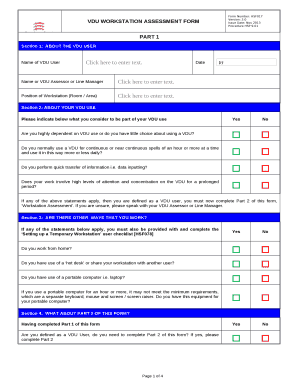
VDU workstation checklist. Checklist for safety representatives. 5. Workstation location and number. (if applicable):. User: Checklist completed by: Assessment .

How it works

  1. Open form

    Open form follow the instructions

  2. Easily sign form

    Easily sign the form with your finger

  3. Share form

    Send filled & signed form or save

How to fill out the Workstation Assessment Template online

This guide provides detailed instructions for completing the Workstation Assessment Template online. By following these steps, users can ensure accurate and complete assessments of their workstation setups.

Follow the steps to complete your assessment effectively.

  1. Click 'Get Form' button to obtain the Workstation Assessment Template and open it in your preferred online editor.
  2. In Section 1, enter the name of the VDU user, the current date, the name of the VDU assessor or line manager, and the position of the workstation (room/area). Make sure all fields are correctly filled out.
  3. Proceed to Section 2, where you will answer a series of yes/no questions regarding your VDU usage. Carefully consider each statement before answering.
  4. In Section 3, you will indicate if there are other ways you work, such as working from home or using a portable computer. Complete this section truthfully to provide a comprehensive view of your work setup.
  5. Section 4 prompts you to complete Part 2 of the form if you qualify as a VDU user. Make sure to answer the questions about your workstation, ensuring that your responses reflect your actual setup.
  6. Continue through Part 2, answering the questions relating to your chair, screen, desk, keyboard, mouse, and overall work area. Provide thoughtful answers that accurately assess your workstation condition.
  7. Once all sections of the form are filled out, review your answers for completeness and accuracy. Make any necessary corrections.
  8. Finally, save your changes, and you can choose to download, print, or share the completed Workstation Assessment Template as needed.

Complete your Workstation Assessment Template online today to ensure your workstation is optimized for your needs.

Get form

Experience a faster way to fill out and sign forms on the web. Access the most extensive library of templates available.
Get form

Related content

Computer Workstations eTool - OSHA
Use the evaluation checklist to analyze existing workstations. ... A more in-depth look at...
Learn more
Computer Workstation Ergonomics: Self-Assessment...
Computer Workstation Ergonomics: Self-Assessment Checklist. The goal of this...
Learn more
M ACHINERY SAFEBOOK 5 - Literature Library |...
Type B1 STANDARDS: Cover particular safety and ergonomic aspects of ... ISO TR 14121-2...
Learn more

Related links form

BB Form A Storyboard Template US Chile Free Trade Agreement Zenith Job Safety Analysis

Questions & Answers

Get answers to your most pressing questions about US Legal Forms API.

Contact support

armrests, if provided, should be height adjustable or removable to avoid interfering with natural movement of the arms. lumbar-support cushion if chair does not provide adequate lower back support. seat cushion or seat wedge. footrest if VDT user's feet do not rest firmly and comfortably on the floor.

Your employees should do a DSE assessment when they first join your company, when they change workstations and/or make significant changes to their current workstations. This means hybrid workers must assess both their office and home workstations.

Employers must also do an assessment when: a new workstation is set up. a new user starts work. a change is made to an existing workstation or the way it's used.

Always Work in the Neutral Posture Good upper body posture (shoulders back but relaxed—not slumping forward over the keyboard) Back supported by chair. Chair seat should not compress behind the knees. Feet firmly on a surface for support (floor/footrest) Head balanced on neck (not tilted back or too far forwards)

There are no specific ergonomics regulations, although OSHA will continue to cite ergonomic injuries under the General Duty Clause of the Occupational Safety and Health Act, Section 5. All employees are covered by OSHA under this section.

An ergonomic assessment is an assessment of a worker at their workstation to ensure correct working postures and workstation set-up. A good ergonomic assessment is done to reduce a worker's exposure to physical hazards such as: Uncomfortable postures. Repetitive tasks.

It is a process to identify risks that may affect the health of the user. It includes looking at the keyboard, mouse, display screen, desk, chair, footrest and the working environment.

An ergonomic workstation assessment creates an opportunity to increase understanding of the interactions between the individual and their work space, as well as to ensure optimal set up and effective human factors are in place.

There are no specific OSHA standards that apply to computer workstations or extremely low frequency electric and magnetic field exposure. Existing OSHA standards on electrical safety, radiation exposure, and noise apply to all workplaces including office environments.

It is a process to identify risks that may affect the health of the user. It includes looking at the keyboard, mouse, display screen, desk, chair, footrest and the working environment. The HSE website has an Office Risk Assessment Tool.

Get This Form Now!

Use professional pre-built templates to fill in and sign documents online faster. Get access to thousands of forms.
Get form
If you believe that this page should be taken down, please follow our DMCA take down processhere.

Industry-leading security and compliance

US Legal Forms protects your data by complying with industry-specific security standards.
  • In businnes since 1997
    25+ years providing professional legal documents.
  • Accredited business
    Guarantees that a business meets BBB accreditation standards in the US and Canada.
  • Secured by Braintree
    Validated Level 1 PCI DSS compliant payment gateway that accepts most major credit and debit card brands from across the globe.
Get Workstation Assessment Template
Get form
Form Packages
Adoption
Bankruptcy
Contractors
Divorce
Home Sales
Employment
Identity Theft
Incorporation
Landlord Tenant
Living Trust
Name Change
Personal Planning
Small Business
Wills & Estates
Packages A-Z
Form Categories
Affidavits
Bankruptcy
Bill of Sale
Corporate - LLC
Divorce
Employment
Identity Theft
Internet Technology
Landlord Tenant
Living Wills
Name Change
Power of Attorney
Real Estate
Small Estates
Wills
All Forms
Forms A-Z
Form Library
Customer Service
Terms of Service
Privacy Notice
Legal Hub
Content Takedown Policy
Bug Bounty Program
About Us
Help Portal
Legal Resources
Blog
Affiliates
Contact Us
Delete My Account
Site Map
Industries
Forms in Spanish
Localized Forms
State-specific Forms
Forms Kit
Legal Guides
Real Estate Handbook
All Guides
Prepared for You
Notarize
Incorporation services
Our Customers
For Consumers
For Small Business
For Attorneys
Our Sites
US Legal Forms
USLegal
FormsPass
pdfFiller
signNow
airSlate WorkFlow
DocHub
Instapage
Social Media
Call us now toll free:
+1 833 426 79 33
As seen in:
  • USA Today logo picture
  • CBC News logo picture
  • LA Times logo picture
  • The Washington Post logo picture
  • AP logo picture
  • Forbes logo picture
© Copyright 1997-2025
airSlate Legal Forms, Inc.
3720 Flowood Dr, Flowood, Mississippi 39232
Form Packages
Adoption
Bankruptcy
Contractors
Divorce
Home Sales
Employment
Identity Theft
Incorporation
Landlord Tenant
Living Trust
Name Change
Personal Planning
Small Business
Wills & Estates
Packages A-Z
Form Categories
Affidavits
Bankruptcy
Bill of Sale
Corporate - LLC
Divorce
Employment
Identity Theft
Internet Technology
Landlord Tenant
Living Wills
Name Change
Power of Attorney
Real Estate
Small Estates
Wills
All Forms
Forms A-Z
Form Library
Customer Service
Terms of Service
Privacy Notice
Legal Hub
Content Takedown Policy
Bug Bounty Program
About Us
Help Portal
Legal Resources
Blog
Affiliates
Contact Us
Delete My Account
Site Map
Industries
Forms in Spanish
Localized Forms
State-specific Forms
Forms Kit
Legal Guides
Real Estate Handbook
All Guides
Prepared for You
Notarize
Incorporation services
Our Customers
For Consumers
For Small Business
For Attorneys
Our Sites
US Legal Forms
USLegal
FormsPass
pdfFiller
signNow
airSlate WorkFlow
DocHub
Instapage
Social Media
Call us now toll free:
+1 833 426 79 33
As seen in:
  • USA Today logo picture
  • CBC News logo picture
  • LA Times logo picture
  • The Washington Post logo picture
  • AP logo picture
  • Forbes logo picture
© Copyright 1997-2025
airSlate Legal Forms, Inc.
3720 Flowood Dr, Flowood, Mississippi 39232