Loading
Form preview
  • US Legal Forms
  • Form Library
  • Miscellaneous Forms
  • Multi-State Miscellaneous Forms
  • Sleep Quality Assessment (psqi)

Get Sleep Quality Assessment (psqi)

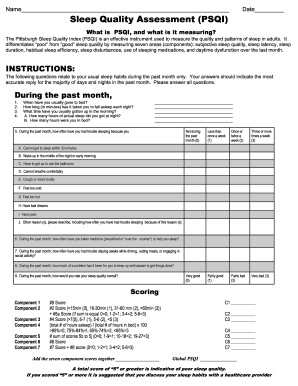
Name________________________________________________________________ Date_________ Sleep Quality Assessment (PSQI) What is PSQI, and what is it measuring? The Pittsburgh Sleep Quality Index (PSQI) is an effective instrument used to measure the quality and patterns of sleep in adults. It differentiates “poor” from “good” sleep quality by measuring seven areas (components): subjective sleep quality, sleep latency, sleep duration, habitual sleep efficiency, sleep disturbances, use of slee.

How it works

  1. Open form

    Open form follow the instructions

  2. Easily sign form

    Easily sign the form with your finger

  3. Share form

    Send filled & signed form or save

How to fill out the Sleep Quality Assessment (PSQI) online

The Pittsburgh Sleep Quality Index (PSQI) is a valuable tool for assessing sleep quality and patterns over the past month. This guide provides you with detailed instructions to help you complete the PSQI online efficiently and accurately.

Follow the steps to submit your Sleep Quality Assessment seamlessly.

  1. Use the ‘Get Form’ button to access and open the Sleep Quality Assessment form in your browser.
  2. Begin by providing your name and the date at the top of the form to identify your submission.
  3. In the first section, answer the questions related to your usual sleep habits over the past month. Ensure your responses reflect the majority of your experiences.
  4. For question one, indicate the usual times you went to bed and woke up. Equal attention should be paid to the time taken to fall asleep (in minutes) and the actual sleep duration.
  5. Continue to the subsequent questions that ask about difficulties you faced while sleeping. Choose from the provided frequency options to describe your experiences.
  6. Answer questions regarding the use of sleep medications, trouble staying awake during the day, and any challenges in maintaining motivation.
  7. Once you have completed all questions, review your answers for clarity and accuracy.
  8. Finalize your assessment by calculating the total scores for each component and the global PSQI score, following the provided scoring guidelines.
  9. After thoroughly checking your form, proceed to save your changes, and download or print your completed PSQI for your records or to share with a healthcare provider.

Start filling out your Sleep Quality Assessment online today for better sleep insights.

Get form

Experience a faster way to fill out and sign forms on the web. Access the most extensive library of templates available.
Get form

Related content

The Pittsburgh Sleep Quality Index: a new...
by DJ Buysse · 1989 · Cited by 40659 — The Pittsburgh Sleep Quality Index (PSQI) is a...
Learn more
Pittsburgh Sleep Quality Index (PSQI)
Cited by 78 — Purpose As psychiatric disorders are often asso- ciated with sleep...
Learn more
Quality Measures for the Care of Patients with...
by JD Edinger · 2015 · Cited by 58 — Use of a validated questionnaire that assesses...
Learn more

Related links form

Puffin Pet Insurance Claim Form 2020 Cdot Helpline 2020 Oztrail Sportiva Homestead Tent 2020 Einkommensbestätigung 2020

Questions & Answers

Get answers to your most pressing questions about US Legal Forms API.

Contact support

A good sleep quality score on the PSQI is usually considered to be below 5. Scores in this range indicate that you sleep well, with minimal disturbances and adequate rest. Knowing what constitutes a good PSQI score can help you target improvements if necessary. You can use a Sleep Quality Assessment (PSQI) to track your progress and aim for better scores.

The sleep quality assessment scale, known as the Pittsburgh Sleep Quality Index (PSQI), measures sleep quality across several components. These components include sleep duration, disturbances, and perceived sleep quality. Each aspect helps you gain insight into your sleeping patterns and habits. Utilizing the PSQI allows you to systematically track and improve your sleep quality.

A normal sleep quality score on the PSQI is generally regarded as less than five. Scores of this range indicate that an individual experiences good sleep quality with minimal disturbances. If your score exceeds five, it may signal potential sleep issues that warrant examination. Understanding your PSQI score can be the first step toward improving your sleep.

Calculating sleep quality involves inputting personal sleep data into the Sleep Quality Assessment (PSQI). The assessment encompasses various aspects of sleep, such as how long it takes to fall asleep and the number of times one wakes up during the night. After gathering this information, you can sum the scores to obtain your overall sleep quality. This calculation helps identify areas for enhancement.

PSQI sleep scoring involves a standard questionnaire divided into several components, each focusing on different sleep aspects. Participants receive points for different responses, ranging from their sleep duration to how often they feel unrested. The final PSQI score, obtained by summing these points, provides insights into overall sleep quality. This makes it a powerful tool for assessing sleep concerns.

The measurement of sleep score typically utilizes various parameters defined in the Sleep Quality Assessment (PSQI). It involves analyzing sleep duration, sleep efficiency, and the frequency of disturbances. Each factor is assigned a score, which combines to give an overall assessment of sleep quality. This systematic approach helps individuals see how well they are sleeping.

To evaluate sleep quality, a comprehensive Sleep Quality Assessment (PSQI) framework is used. This tool examines several factors, such as sleep duration, disturbances, and overall satisfaction with sleep. By considering these aspects, users can gain a clearer understanding of their sleep patterns. The PSQI helps identify potential areas for improvement.

To calculate the sleep quality score in the Sleep Quality Assessment (PSQI), you sum the scores from each of the seven components, including sleep duration and disturbances. Each component is scored based on specific questions related to sleep experience. Calculating this score gives you an overall view of your sleep patterns, allowing for a better understanding of your sleep health.

Rating the Sleep Quality Assessment (PSQI) involves assigning scores based on self-reported sleep behaviors and perceptions over the past month. Higher scores indicate poorer sleep quality, while lower scores suggest better sleep health. This assessment helps individuals and healthcare providers understand sleep-related issues more clearly.

Research shows that the Sleep Quality Assessment (PSQI) is a reliable tool for evaluating sleep quality across diverse populations. It demonstrates strong internal consistency and stability, making it a preferred choice among healthcare professionals. This reliability makes PSQI a valuable resource for assessing and improving sleep health.

Get This Form Now!

Use professional pre-built templates to fill in and sign documents online faster. Get access to thousands of forms.
Get form
If you believe that this page should be taken down, please follow our DMCA take down processhere.

Industry-leading security and compliance

US Legal Forms protects your data by complying with industry-specific security standards.
  • In businnes since 1997
    25+ years providing professional legal documents.
  • Accredited business
    Guarantees that a business meets BBB accreditation standards in the US and Canada.
  • Secured by Braintree
    Validated Level 1 PCI DSS compliant payment gateway that accepts most major credit and debit card brands from across the globe.
Get Sleep Quality Assessment (PSQI)
Get form
  • Adoption
  • Bankruptcy
  • Contractors
  • Divorce
  • Home Sales
  • Employment
  • Identity Theft
  • Incorporation
  • Landlord Tenant
  • Living Trust
  • Name Change
  • Personal Planning
  • Small Business
  • Wills & Estates
  • Packages A-Z
  • Affidavits
  • Bankruptcy
  • Bill of Sale
  • Corporate - LLC
  • Divorce
  • Employment
  • Identity Theft
  • Internet Technology
  • Landlord Tenant
  • Living Wills
  • Name Change
  • Power of Attorney
  • Real Estate
  • Small Estates
  • Wills
  • All Forms
  • Forms A-Z
  • Form Library
  • Legal Hub
  • About Us
  • Help Portal
  • Legal Resources
  • Blog
  • Affiliates
  • Contact Us
  • Delete My Account
  • Site Map
  • Industries
  • Forms in Spanish
  • Localized Forms
  • State-specific Forms
  • Forms Kit
  • Real Estate Handbook
  • All Guides
  • Notarize
  • Incorporation services
  • For Consumers
  • For Small Business
  • For Attorneys
  • USLegal
  • FormsPass
  • pdfFiller
  • signNow
  • altaFlow
  • DocHub
  • Instapage
Form Packages
  • Adoption
  • Bankruptcy
  • Contractors
  • Divorce
  • Home Sales
  • Employment
  • Identity Theft
  • Incorporation
  • Landlord Tenant
  • Living Trust
  • Name Change
  • Personal Planning
  • Small Business
  • Wills & Estates
  • Packages A-Z
Form Categories
  • Affidavits
  • Bankruptcy
  • Bill of Sale
  • Corporate - LLC
  • Divorce
  • Employment
  • Identity Theft
  • Internet Technology
  • Landlord Tenant
  • Living Wills
  • Name Change
  • Power of Attorney
  • Real Estate
  • Small Estates
  • Wills
  • All Forms
  • Forms A-Z
  • Form Library
Customer Service
  • Legal Hub
  • About Us
  • Help Portal
  • Legal Resources
  • Blog
  • Affiliates
  • Contact Us
  • Delete My Account
  • Site Map
  • Industries
  • Forms in Spanish
  • Localized Forms
  • State-specific Forms
  • Forms Kit
Legal Guides
  • Real Estate Handbook
  • All Guides
Prepared for you
  • Notarize
  • Incorporation services
Our Customers
  • For Consumers
  • For Small Business
  • For Attorneys
Our Sites
  • USLegal
  • FormsPass
  • pdfFiller
  • signNow
  • altaFlow
  • DocHub
  • Instapage
Social Media
Call us now toll free:
+1 833 426 79 33
As seen in:
© Copyright 1999-2026 airSlate Legal Forms, Inc. 3720 Flowood Dr, Flowood, Mississippi 39232
  • Your Privacy Choices
  • Terms of Service
  • Privacy Notice
  • Content Takedown Policy
  • Bug Bounty Program