Loading
Get Sacramento Spca Community Service Timesheet
How it works
-

Open form follow the instructions
-

Easily sign the form with your finger
-

Send filled & signed form or save
How to fill out the SACRAMENTO SPCA Community Service Timesheet online
Filling out the SACRAMENTO SPCA Community Service Timesheet online is an important step in documenting your community service hours. This guide will provide you with clear instructions to ensure that you complete the form accurately and efficiently.
Follow the steps to successfully fill out the timesheet.
- Click the ‘Get Form’ button to access the timesheet and open it in your preferred editor.
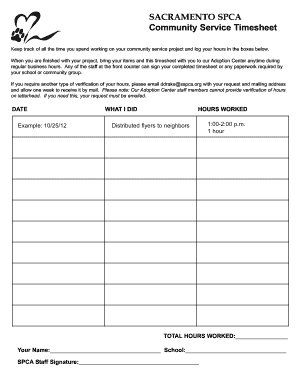
- In the 'DATE' field, enter the date you completed your community service project. Use the format MM/DD/YY (e.g., 10/25/12).
- In the 'WHAT I DID' section, provide a brief description of the tasks you completed during your community service. Be specific and concise.
- In the 'HOURS WORKED' section, indicate the time you started and ended your work on the project. For example, you might write '1:00-2:00 p.m.' and then note the total hours worked, such as '1 hour'.
- Once you have logged your hours, calculate the total hours worked and enter this number in the 'TOTAL HOURS WORKED' field.
- In the final section, enter your name and the name of your school in the provided fields.
- To complete the form, ensure that a staff member from the SPCA signs the timesheet. You can take it to the Adoption Center during regular business hours for signature.
- Finally, save changes, download, print, or share the timesheet as required.
Complete your community service documentation online today.
SPCA is the only charity with the legal powers to help animals in need and bring animal offenders to justice. Our Inspectors are appointed under the Animal Welfare Act 1999 which provides powers to investigate cruelty, abuse, neglect and abandonment.