Loading
Form preview
  • US Legal Forms
  • Form Library
  • More Forms
  • More Multi-State Forms
  • Tenant Incident Report

Get Tenant Incident Report

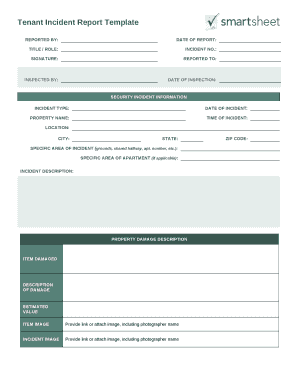
Tenant Incident Report TemplateREPORTED BY:DATE OF REPORT:TITLE / ROLE:INCIDENT NO.:SIGNATURE:REPORTED TO:INSPECTED BY:DATE OF INSPECTION:SECURITY INCIDENT INFORMATION INCIDENT TYPE:DATE OF INCIDENT:PROPERTY.

How it works

  1. Open form

    Open form follow the instructions

  2. Easily sign form

    Easily sign the form with your finger

  3. Share form

    Send filled & signed form or save

How to fill out the Tenant Incident Report online

Filling out a Tenant Incident Report online is a straightforward process that ensures important information is documented accurately. This guide provides step-by-step instructions to help you navigate through the form efficiently, ensuring all necessary details are captured.

Follow the steps to complete the Tenant Incident Report online successfully.

  1. Click the ‘Get Form’ button to access the Tenant Incident Report and open it in your chosen application.
  2. Begin by entering the report details in the 'Reported By' section. Fill in the date of the report, your role or title, and the incident number assigned to the report.
  3. Sign the form in the designated 'Signature' field to confirm the report's accuracy. Then, indicate to whom the report is being submitted.
  4. Complete the 'Inspected By' section by providing the name of the person who inspected the incident, along with the date of inspection.
  5. In the 'Security Incident Information' section, select the incident type and fill out the date, property name, time, and location of the incident.
  6. Specify the exact area of the incident, like grounds or shared hallway, and any specific apartment details, if applicable.
  7. In the 'Incident Description' field, provide a thorough explanation of what occurred during the incident.
  8. Document any property damage by listing the damaged items, describing the damage, estimating their value, and attaching images if available.
  9. If personal injury occurred, complete the 'Personal Injury Description' using the body part list provided. Detail the injuries sustained, events leading to the injury, and any existing conditions.
  10. List the names and contacts of involved parties and witnesses, ensuring accuracy to facilitate follow-up.
  11. If a police report was filed, provide the precinct name, reporting officer, and their phone contact.
  12. Finally, specify any follow-up actions that will be taken regarding the incident. Make sure all sections are completed accurately.
  13. Once you have filled out the entire form, save your changes, and choose to download, print, or share the report as necessary.

Complete your Tenant Incident Report online today for a comprehensive and organized documentation process.

Get form

Experience a faster way to fill out and sign forms on the web. Access the most extensive library of templates available.
Get form

Related content

Offense/Incident Report | GSA
Form: GSA3155. Offense/Incident Report. This form was transferred to Dept of Homeland...
Learn more
Incident/Property Damage Report Form
Incident/Property Damage Report 1. Incident/Property Damage Report Form. (Print this form...
Learn more
TENANT MANUAL - UserManual.wiki
REPORTING PROCESS/SECURITY. ... This Tenant Manual was designed to assist you in the...
Learn more

Related links form

IRS 1040 - Schedule E 1997 IRS 1040 - Schedule EIC 2018 IRS 1040 - Schedule EIC 2017 IRS 1040 - Schedule EIC 2016

Questions & Answers

Get answers to your most pressing questions about US Legal Forms API.

Contact support

Incident Reporters can capture date, time, location, witness statements, property damage, environmental damage, weather factors, work permits, scene changes, and more.

Incident Report Sample Walkthrough: A Step-by-Step Guide Step 1: Provide Fundamental Information. ... Step 2: Take Note of Any Damages and Injuries. ... Step 3: Identify Affected Individual(s) ... Step 4: Identify Witnesses and Take Their Statements. ... Step 5: Take Action. ... Step 6: Close Your Report.

Incident reports include all of the facts related to the incident, such as the contact information of the people involved; a description of the incident itself; and any follow-up actions that were taken, like medical treatment.

5 Simple Rules for. 1 - Make it Accessible. Incident Reporting. 2 - Make it Relevant. Any solution you use should be relevant and adaptable to your. individual needs. Every organisation is different so why should. ... 3 - Make it Known. 4 - Make Time to Train. 5 - Make it Work Hard.

9 facts related to the incident include: The Basics. Identify the specific location, time and date of the incident. ... The Affected. Collect details of those involved and/or affected by the incident. ... The Witnesses. ... The Context. ... The Actions. ... The Environment. ... The Injuries. ... The Treatment.

From near hits to lost time accidents, here are the most common types of incidents that occur in the workplace and require a report. Near Miss. ... Unsafe Acts. ... Workplace Hazards. ... Minor Injury. ... Lost Time Accident. ... Security Incident. ... Fire Incident. ... Fatalities.

They are check, call, and care. We're going to follow those same steps in a cyber emergency.

An incident report should include the following details: The person affected and their contact information. A factual description of the incident, including location, date, and time. A description of the incurred injuries if any. Any involved parties or witnesses and their contact information.

The simple model shown in Figure 1 attempts to illustrate that the causes of any incident can be grouped into five categories - task, material, environment, personnel, and management. When this model is used, possible causes in each category should be investigated.

Common Types of Incident Reports Workplace. Workplace incident reports detail physical events that happen at work and affect an employee's productivity. ... Accident or First Aid. ... Safety and Security. ... Exposure Incident Report.

Get This Form Now!

Use professional pre-built templates to fill in and sign documents online faster. Get access to thousands of forms.
Get form
If you believe that this page should be taken down, please follow our DMCA take down processhere.

Industry-leading security and compliance

US Legal Forms protects your data by complying with industry-specific security standards.
  • In businnes since 1997
    25+ years providing professional legal documents.
  • Accredited business
    Guarantees that a business meets BBB accreditation standards in the US and Canada.
  • Secured by Braintree
    Validated Level 1 PCI DSS compliant payment gateway that accepts most major credit and debit card brands from across the globe.
Get Tenant Incident Report
Get form
  • Adoption
  • Bankruptcy
  • Contractors
  • Divorce
  • Home Sales
  • Employment
  • Identity Theft
  • Incorporation
  • Landlord Tenant
  • Living Trust
  • Name Change
  • Personal Planning
  • Small Business
  • Wills & Estates
  • Packages A-Z
  • Affidavits
  • Bankruptcy
  • Bill of Sale
  • Corporate - LLC
  • Divorce
  • Employment
  • Identity Theft
  • Internet Technology
  • Landlord Tenant
  • Living Wills
  • Name Change
  • Power of Attorney
  • Real Estate
  • Small Estates
  • Wills
  • All Forms
  • Forms A-Z
  • Form Library
  • Legal Hub
  • About Us
  • Help Portal
  • Legal Resources
  • Blog
  • Affiliates
  • Contact Us
  • Delete My Account
  • Site Map
  • Industries
  • Forms in Spanish
  • Localized Forms
  • State-specific Forms
  • Forms Kit
  • Real Estate Handbook
  • All Guides
  • Notarize
  • Incorporation services
  • For Consumers
  • For Small Business
  • For Attorneys
  • USLegal
  • FormsPass
  • pdfFiller
  • signNow
  • altaFlow
  • DocHub
  • Instapage
Form Packages
  • Adoption
  • Bankruptcy
  • Contractors
  • Divorce
  • Home Sales
  • Employment
  • Identity Theft
  • Incorporation
  • Landlord Tenant
  • Living Trust
  • Name Change
  • Personal Planning
  • Small Business
  • Wills & Estates
  • Packages A-Z
Form Categories
  • Affidavits
  • Bankruptcy
  • Bill of Sale
  • Corporate - LLC
  • Divorce
  • Employment
  • Identity Theft
  • Internet Technology
  • Landlord Tenant
  • Living Wills
  • Name Change
  • Power of Attorney
  • Real Estate
  • Small Estates
  • Wills
  • All Forms
  • Forms A-Z
  • Form Library
Customer Service
  • Legal Hub
  • About Us
  • Help Portal
  • Legal Resources
  • Blog
  • Affiliates
  • Contact Us
  • Delete My Account
  • Site Map
  • Industries
  • Forms in Spanish
  • Localized Forms
  • State-specific Forms
  • Forms Kit
Legal Guides
  • Real Estate Handbook
  • All Guides
Prepared for you
  • Notarize
  • Incorporation services
Our Customers
  • For Consumers
  • For Small Business
  • For Attorneys
Our Sites
  • USLegal
  • FormsPass
  • pdfFiller
  • signNow
  • altaFlow
  • DocHub
  • Instapage
Social Media
Call us now toll free:
+1 833 426 79 33
As seen in:
© Copyright 1999-2026 airSlate Legal Forms, Inc. 3720 Flowood Dr, Flowood, Mississippi 39232
  • Your Privacy Choices
  • Terms of Service
  • Privacy Notice
  • Content Takedown Policy
  • Bug Bounty Program