Loading
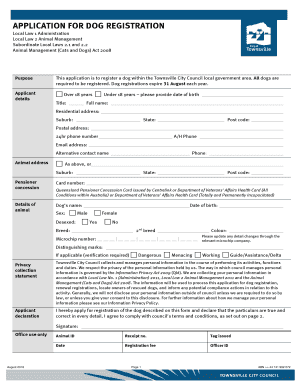
Get Dog Registration Townsville
How it works
-

Open form follow the instructions
-

Easily sign the form with your finger
-

Send filled & signed form or save
How to fill out the Dog Registration Townsville online
Registering your dog with the Townsville City Council is a simple and essential process for dog owners. This guide provides clear, step-by-step instructions to help you complete the Dog Registration form online efficiently.
Follow the steps to complete the Dog Registration form with ease.
- Click 'Get Form' button to access the Dog Registration Townsville form in the online editor.
- Begin by entering your personal details. Provide your title, full name, residential address, suburb, state, post code, and postal address. Ensure that the 24-hour phone number and alternative contact details are correct.
- Specify the animal address if it differs from your residential address. Include the suburb, state, and post code.
- If applicable, provide your pensioner concession card number and relevant details.
- Fill out the dog's information by entering its name, date of birth, sex, desexed status, breed, colour, microchip number, and any distinguishing marks.
- Indicate whether your dog is categorized as dangerous, menacing, working, or as a guide/assistance dog, if applicable.
- Read and acknowledge the terms and conditions related to dog ownership as stated in the application. Confirm your understanding.
- Finish the application by signing the declaration to confirm that all the provided information is accurate and that you agree to the council's terms and conditions.
- Once the form is completed, save your changes. You can then download, print, or share the form as needed.
Complete your Dog Registration online today to ensure compliance and keep your pet safe!
Fees TaskTypeAmountApplyApplication$17.40ApplyApplication$204.00