Loading
Get Employment Application Form - Home Nursing Foundation - Hnf Org
How it works
-

Open form follow the instructions
-

Easily sign the form with your finger
-

Send filled & signed form or save
How to fill out the EMPLOYMENT APPLICATION FORM - Home Nursing Foundation - Hnf Org online
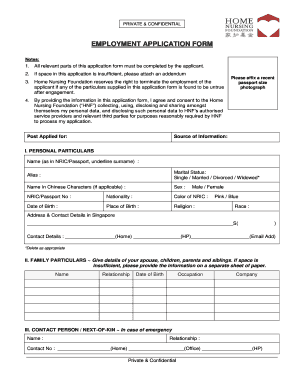
Filling out the Employment Application Form for the Home Nursing Foundation is a crucial step in your job application process. This guide will walk you through each section of the form, providing clear instructions to ensure your application is complete and accurate.
Follow the steps to successfully submit your application online.
- Press the ‘Get Form’ button to obtain the application form and open it in your preferred editor.
- Begin with the 'Post Applied for' and 'Source of Information' sections. Clearly specify the job position you are applying for and how you heard about this opportunity.
- In the 'Personal Particulars' section, fill in your full name as it appears on your NRIC or passport, underline your surname. Provide your alias if applicable, and indicate your marital status by deleting options that do not apply.
- Provide your NRIC or passport number, nationality, and include a passport-sized photograph as instructed.
- Complete your 'Contact Details' by providing your address in Singapore and your home, mobile, and email contact information.
- In the 'Family Particulars' section, list your immediate family members including your spouse and children, along with their occupations and birthdays. Use a separate sheet if necessary.
- Identify your 'Contact Person/Next-of-Kin' for emergencies, including their relationship to you and multiple contact numbers.
- Fill out the 'Educational Profile' by attaching photocopies of academic certificates, indicating the institutions attended and qualifications attained.
- Complete the sections regarding any current courses you are pursuing, scholarships and awards you have received, computer literacy, language proficiency, and volunteering experiences.
- List your employment history, starting with your most recent employment. Include each employer's name, your position held, employment dates, last salary drawn, and your reasons for leaving.
- Provide references excluding family members. Fill in the name, occupation, years known, and contact number for each reference.
- Complete the 'General Information' section by answering all questions truthfully regarding any medical conditions, disciplinary actions, or connections to current staff.
- In the final section, certify the accuracy of your provided information by signing and dating the application form.
- Once you have filled out the application form thoroughly, save your changes, and download or print a copy for your records. Ensure you retain a copy before submitting the application.
Get started on your application today by filling out the form online!
Related links form
Industry-leading security and compliance
US Legal Forms protects your data by complying with industry-specific security standards.
-
In businnes since 199725+ years providing professional legal documents.
-
Accredited businessGuarantees that a business meets BBB accreditation standards in the US and Canada.
-
Secured by BraintreeValidated Level 1 PCI DSS compliant payment gateway that accepts most major credit and debit card brands from across the globe.