Loading
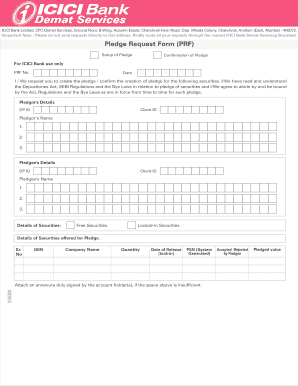
Get Pledge Request Form.cdr - Icici Bank
How it works
-

Open form follow the instructions
-

Easily sign the form with your finger
-

Send filled & signed form or save
How to fill out the Pledge Request Form.cdr - ICICI Bank online
Filling out the Pledge Request Form is essential for creating or confirming the creation of a pledge for your securities with ICICI Bank. This guide provides step-by-step instructions to help you complete the form accurately and efficiently.
Follow the steps to complete the Pledge Request Form.
- Press the ‘Get Form’ button to access the Pledge Request Form and open it in your editor.
- Begin by providing your personal details in the 'Pledgor's Details' section. Enter your Client ID and DP ID accurately, along with your name. If there are multiple pledgors, ensure that each name is entered in the designated fields.
- Next, fill out the 'Pledgee's Details' section. Similar to the previous step, include the Client ID, DP ID, and name of the pledgee.
- In the 'Details of Securities' section, list the securities you intend to pledge. For each security, provide the ISIN, company name, quantity, and lock-in release date if applicable. If you require additional space, attach a signed annexure.
- Proceed to specify the 'Pledged value' and fill in the 'Pledge Execution Date.' Also, indicate the 'Pledge Expiry Date,' ensuring all date formats are correct.
- Add the total pledge value in Indian Rupees (Rs.) and the agreement number, if available. Make sure all fields are filled completely.
- Sign the form as the pledgor. If there are multiple applicants, ensure that each one has signed in the designated spaces provided.
- If the pledgee is accepting the pledge, they should also sign in the appropriate fields. Note that if the pledgee is a bank DP, their signature may not be necessary.
- Finally, check all the filled information for accuracy. You can then save changes, download the completed form, print, or share it as needed.
Complete your Pledge Request Form online today to manage your securities effectively.
Yes. A request can be made for closing or invoking the pledge either in full or in parts.