Loading
Get Xelsource Patient Portal
How it works
-

Open form follow the instructions
-

Easily sign the form with your finger
-

Send filled & signed form or save
How to fill out the Xelsource Patient Portal online
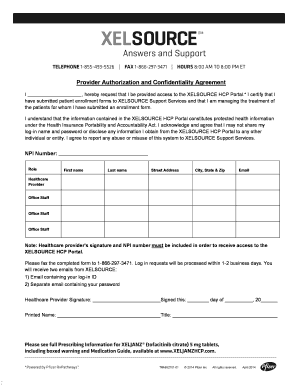
The Xelsource Patient Portal enables healthcare providers to access important patient information securely. This guide will walk you through the process of completing the necessary authorization form to access the portal.
Follow the steps to complete your authorization request
- Click the ‘Get Form’ button to obtain the authorization form and open it for editing.
- In the first section, fill in your details by providing your first name, last name, and NPI number. Ensure that all information is accurate to avoid processing delays.
- Specify your role in the healthcare setting by selecting one of the options: 'Healthcare Provider' or 'Office Staff'.
- Complete the address section, including the street address, city, state, and ZIP code.
- Enter your email address to ensure you receive important communications regarding your access to the portal.
- Review the confidentiality agreement. You will need to acknowledge your understanding of protecting the contained health information before you can proceed.
- Sign and date the healthcare provider signature section. This step is crucial for your request to be processed.
- After filling out the form, fax the completed document to 1-866-297-3471. The requests will be evaluated within 1-2 business days.
- Upon processing, you will receive two separate emails: one with your log-in ID and the other with your password for accessing the portal.
- Finally, save your changes, download a copy for your records, or print the form as needed.
Complete your form online today to gain access to the Xelsource Patient Portal.
Pfizer RxPathways connects eligible patients to assistance programs that offer insurance support, co-pay† assistance, and medicines for free or at a saving. Learn more by visiting .PfizerRxPathways.com or calling 1‑844‑989‑PATH (7284).