Loading
Get Ny Dmv Mv-664.1mp 2017-2026
How it works
-

Open form follow the instructions
-

Easily sign the form with your finger
-

Send filled & signed form or save
How to fill out the NY DMV MV-664.1MP online
This guide provides a clear and comprehensive overview of how to complete the NY DMV MV-664.1MP form online for a metered parking waiver intended for people with severe disabilities. By following these steps, you can ensure that your application is filled out correctly and efficiently.
Follow the steps to complete the NY DMV MV-664.1MP online effectively.
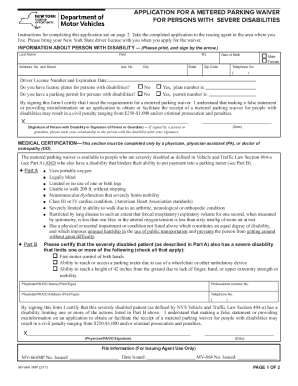
- Click 'Get Form' button to obtain the form and open it in the editor. This will allow you to access the document needed for your metered parking waiver application.
- Provide your personal information by clearly printing your last name, first name, middle initial, address, city, state, zip code, date of birth, and telephone number. Ensure all details are accurate.
- Enter your New York State driver license number and expiration date. Verify that the expiration date is in the future to avoid complications.
- Indicate if you possess license plates for persons with disabilities by checking 'Yes' or 'No', and if yes, include the plate number. Similarly, state if you have a permanent parking permit and include that permit number if applicable.
- Review the certification statement carefully, then sign and date the form in the designated area, ensuring that the signature is of the person with a disability or their parent/guardian.
- Bring the completed application to a licensed physician, physician assistant, or doctor of osteopathy. They must fill out the Medical Certification section, confirming the disability and signing the form.
- Once completed, take the application to the appropriate issuing agent in your area for processing. This is typically a town, village, or city clerk or local police department. Call ahead if needed to confirm the correct location.
Take the next step and complete your document online to apply for your metered parking waiver.