Loading
Get Ca Re 227 2020-2026
How it works
-

Open form follow the instructions
-

Easily sign the form with your finger
-

Send filled & signed form or save
How to fill out the CA RE 227 online
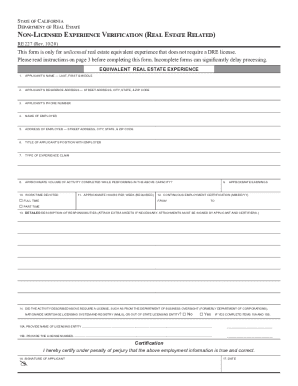
Filling out the CA RE 227 form is an essential step for individuals claiming non-licensed real estate equivalent experience that does not require a Department of Real Estate license. This guide provides detailed instructions on each section of the form to ensure an accurate and complete submission.
Follow the steps to successfully complete the CA RE 227 form.
- Click ‘Get Form’ button to obtain the form and open it in the editor.
- In the first section, enter your name, including your last name, first name, and middle name. This ensures accurate identification.
- Provide your residence address, including street address, city, state, and ZIP code. This information is necessary for contact and verification purposes.
- Input your phone number to allow the Department to contact you if needed.
- Enter the name of your employer to establish your work experience relevant to the application.
- List the address of your employer, ensuring to include street address, city, state, and ZIP code.
- Specify your title with the employer, reflecting your position during your employment.
- Indicate the type of experience you are claiming. This is crucial to understanding the nature of your non-licensed equivalent experience.
- Provide an estimate of the volume of activity completed while performing in your capacity, as this supports your claim of experience.
- Indicate your work time devoted — specify 'full-time' or 'part-time.' Be mindful of the definitions of these terms.
- Enter the approximate number of hours you worked each week, which is a required field.
- Provide your approximate earnings during the time of experience to give context to your claim.
- Fill in the continuous employment certification dates (from and to) to confirm the duration of your experience.
- Offer a detailed description of your responsibilities. You may need to attach extra sheets if necessary, ensuring those sheets are signed.
- Respond to the question regarding whether your activities required a license, and if yes, provide the licensing entity and number.
- Sign the form to certify the information is true and correct, along with the date of signing.
- Ensure the form is signed by two certifiers who are not related to you and who can validate your experience.
- Review your completed form carefully for accuracy before finalizing and saving it.
- You may save changes, download, print, or share the form as needed for your submission.
Complete your CA RE 227 form online today to ensure a smooth submission process.