Loading
Get De Mv573 2019-2026
How it works
-

Open form follow the instructions
-

Easily sign the form with your finger
-

Send filled & signed form or save
How to fill out the DE MV573 online
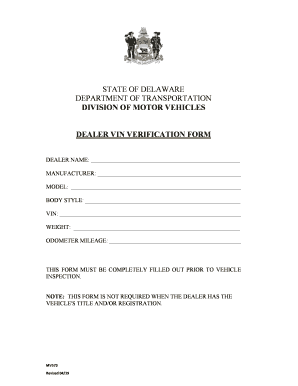
The DE MV573 is essential for vehicle dealer transactions in Delaware, facilitating the verification process for vehicle identification numbers. This guide provides clear, step-by-step instructions to help you complete the form accurately and efficiently online.
Follow the steps to complete the DE MV573 online
- Click ‘Get Form’ button to obtain the DE MV573 and open it in your browser.
- Begin filling out the form by entering the dealer name in the designated space.
- Input the manufacturer of the vehicle in the next field, ensuring the correct spelling.
- In the 'Model' section, specify the vehicle's model, as it appears on the manufacturer's label.
- Next, indicate the body style of the vehicle, selecting from options like sedan, SUV, or truck.
- Provide the Vehicle Identification Number (VIN). Make sure to double-check for accuracy.
- Fill in the weight of the vehicle in the appropriate field.
- Record the odometer mileage, ensuring it accurately reflects the vehicle's current reading.
- Review all entries for accuracy and completeness. Confirm that the form is fully filled out.
- Once all fields are complete, you can save your changes, download, print, or share the form as needed.
Complete the DE MV573 online today to streamline your vehicle dealership process.