Loading
Get Show Horse Council Tasmania
How it works
-

Open form follow the instructions
-

Easily sign the form with your finger
-

Send filled & signed form or save
How to fill out the Show Horse Council Tasmania online
Filling out the Show Horse Council Tasmania membership application can be straightforward with the right guidance. This guide will help you complete the application form with clarity, ensuring all necessary information is provided accurately.
Follow the steps to successfully complete your application.
- Click ‘Get Form’ button to access the application form and open it in the editor.
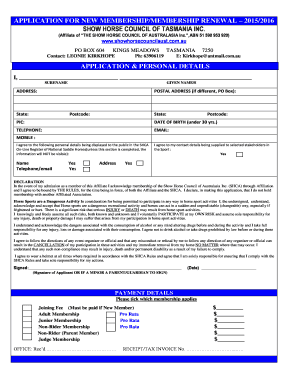
- Begin filling out the APPLICATION & PERSONAL DETAILS section. Provide your surname, given names, and your full address, including postal details if applicable.
- Fill in your date of birth, ensuring to mark if you are under 30 years, along with your telephone number and email address.
- Indicate if you agree to have certain personal details displayed on the public register. This includes options to display your name, telephone, and email.
- Read through the DECLARATION section thoroughly. This includes understanding the risks associated with horse sports and agreeing to abide by the rules set by the Show Horse Council.
- Sign the application form. If the applicant is underage, ensure a parent or guardian signs the form.
- Move on to fill out the PAYMENT DETAILS section. Select the applicable membership type and fee, ensuring to include the joining fee if you are a new member.
- Complete your membership categories and fees, indicating the correct amounts based on your selection. Ensure direct deposit options are clearly marked if chosen.
- Once all sections are completed, save the form. You can download, print, or share the application as needed before submission.
Get started on your online application today and secure your membership with the Show Horse Council Tasmania.
Get form
Experience a faster way to fill out and sign forms on the web. Access the most extensive library of templates available.
Get This Form Now!
Use professional pre-built templates to fill in and sign documents online faster. Get access to thousands of forms.