Loading
Get Wisconsinvip
How it works
-

Open form follow the instructions
-

Easily sign the form with your finger
-

Send filled & signed form or save
How to fill out the Wisconsinvip online
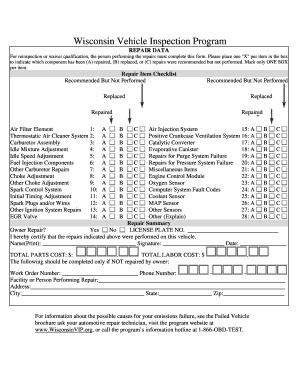
Filling out the Wisconsinvip form is crucial for those seeking vehicle repair inspections or waivers. This guide will assist you in accurately completing the online document, ensuring that all necessary information is provided in a streamlined manner.
Follow the steps to effectively complete the Wisconsinvip form online.
- Press the ‘Get Form’ button to access the document and open it in your online editor.
- In the repair item checklist, carefully examine each component listed. For each item, mark one box: indicate whether the component has been repaired, replaced, or if repairs were recommended but not performed.
- Continue down the checklist, ensuring that you consistently mark only one box per item to accurately reflect the status of each repair.
- Fill out the owner repair section, indicating if the repairs were indeed performed on the vehicle by placing an 'X' in the appropriate field.
- Provide your license plate number and fill in your name in the designated area, making sure to add your signature and the date to validate the document.
- Calculate the total parts cost and the total labor cost, entering the respective amounts in the designated fields.
- If the repairs were not performed by you, complete the additional section with the work order number, phone number, and the name and address of the facility or person who completed the repairs.
- Double-check all fields for accuracy before finalizing the document.
- Once you have verified that all information is correct, save your changes, and choose to download, print, or share the completed form as needed.
Start completing your Wisconsinvip form online today!
Related links form
Answer: If you fail the Emissions Test, you will be required to have the issue repaired. This may cause a delay in your vehicle registration. At the time of your failed test, your inspector will be able to explain the repair and retest process.