Loading
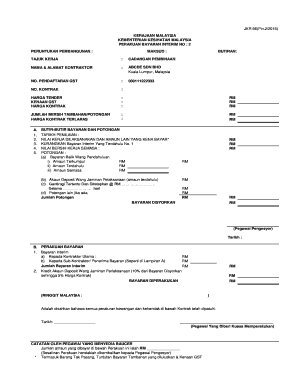
Get Jkr 66(pin
How it works
-

Open form follow the instructions
-

Easily sign the form with your finger
-

Send filled & signed form or save
How to fill out the JKR 66(Pin online
Filling out the JKR 66(Pin) form efficiently is essential for proper documentation of interim payment certifications in construction projects. This guide provides a step-by-step approach to help users complete the form accurately and confidently.
Follow the steps to complete the JKR 66(Pin) form online.
- Click the 'Get Form' button to obtain the form and open it in the editor.
- Fill in the 'Perakuan Bayaran Interim No.' section with the relevant interim payment number. This number is crucial for tracking the payment process.
- Provide the 'Peruntukan Pembangunan' detailing the development allocation associated with the interim payment.
- Enter the 'Tajuk Kerja', which refers to the title of work related to the payment. Ensure that it accurately describes the project.
- Complete the 'Nama & Alamat Kontraktor' section where you will specify the contractor's name and address. This identifies the party responsible for the work.
- Specify the 'No. Pendaftaran GST' to indicate the contractor's GST registration number, ensuring compliance with tax regulations.
- Input the 'No. Kontrak' to refer to the contract number tied to the interim payment.
- Fill out the pricing details including 'Harga Tender', 'Kenaaan GST', and 'Harga Kontrak'. These fields must reflect the monetary accuracy relevant to the current payment.
- Next, calculate and enter the 'Jumlah Bersih Tambahan/Potongan' based on adjustments made to the contract price during the project.
- In the 'Butir-Butir Bayaran dan Potongan', provide detailed information about the various deductions and payments relating to the current work performed.
- Complete all sections concerning deductions including parts detailing payment backlogs and retention amounts.
- Summarize the payments and deductions in the 'Bayaran Disyorkan' section, ensuring that all numerical entries are accurate.
- Verify that you include the proper sign-offs by the recommending officer and authorize the payment, capturing necessary dates.
- Finally, save your changes, download, print, or share the form as appropriate to ensure that your documentation is properly stored for future reference.
Complete the JKR 66(Pin) form online for accurate documentation and prompt processing of your interim payments.
Industry-leading security and compliance
US Legal Forms protects your data by complying with industry-specific security standards.
-
In businnes since 199725+ years providing professional legal documents.
-
Accredited businessGuarantees that a business meets BBB accreditation standards in the US and Canada.
-
Secured by BraintreeValidated Level 1 PCI DSS compliant payment gateway that accepts most major credit and debit card brands from across the globe.