Get My Hsbc Business Account Application Form 2013
How it works
-

Open form follow the instructions
-

Easily sign the form with your finger
-

Send filled & signed form or save
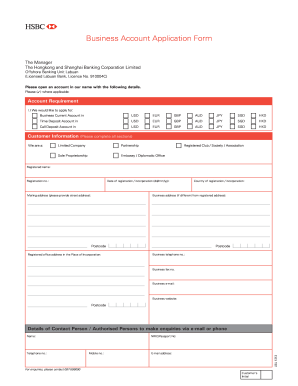
How to fill out the MY HSBC Business Account Application Form online
Filling out the MY HSBC Business Account Application Form online can be a straightforward process with the right guidance. This guide aims to provide you with clear, step-by-step instructions to ensure that you complete the form accurately and efficiently.
Follow the steps to successfully complete the MY HSBC Business Account Application Form.
- Press the ‘Get Form’ button to access the MY HSBC Business Account Application Form and open it in your preferred editor.
- In the 'Account Requirement' section, select the type of account you wish to apply for by marking the appropriate checkbox. You can choose between a Business Current Account, Time Deposit Account, or Call Deposit Account, indicating the currency of your choice.
- Move on to the 'Details of Contact Person' section. Input the name, mobile number, email address, telephone number, and identification number of the individual authorized to make inquiries about the account.
- In the 'Information of Directors/Partners/Sole Proprietor/Signatories/Office Bearers' section, fill out each person's information, including full names, occupations, sources of wealth, dates of birth, and identification numbers.
Start preparing your MY HSBC Business Account Application Form online today to ensure a smooth and efficient account opening process.
Get form
To successfully open your HSBC account, you’ll need documents such as your business license, any applicable permits, your EIN, and personal identification. Aligning these documents before completing the MY HSBC Business Account Application Form can significantly streamline the opening process. For additional assistance, consider using platforms like uslegalforms for document preparation support.