Loading
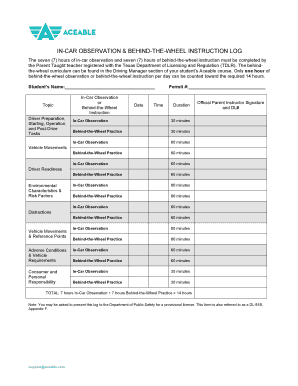
Get Aceable In Car Observation Log
How it works
-

Open form follow the instructions
-

Easily sign the form with your finger
-

Send filled & signed form or save
How to fill out the Aceable In Car Observation Log online
Filling out the Aceable In Car Observation Log is a crucial step in documenting the required hours of in-car observation and behind-the-wheel instruction. This guide will help you navigate the online form to ensure all necessary information is accurately recorded.
Follow the steps to complete your In Car Observation Log.
- Click ‘Get Form’ button to obtain the form and open it in the editor.
- Begin by entering the student's name in the designated field. Ensure that the spelling is correct to avoid any issues in processing the form.
- Fill in the permit number in the corresponding space. This number is essential for record-keeping and verification.
- Proceed to document each in-car observation and behind-the-wheel instruction session. For each session, indicate the date, duration, and whether it was an observation or practice. Use the listed duration options as a guide.
- Continue filling out sections for adverse conditions and vehicle requirements. Ensure that you accurately log the time spent on both observations and practice sessions.
- Once you have completed the log, review all entries for accuracy. Checking your entries will help avoid errors that may complicate submission.
- After confirming all details are correct, you can save your changes, download a copy for your records, print the form if needed, or share it with your instructor.
Complete your Aceable In Car Observation Log online today!
Texas law requires teens to complete a 32 hour theory course, 7 hours of driving & 7 hours of observation. An additional 30 hours of driving must be logged with a parent or instructor before you can get your license.