Loading
Form preview
  • US Legal Forms
  • Other Templates
  • Miscellaneous Forms
  • Multi-State Miscellaneous Forms
  • Media Group Recreation News Announcement Form

Get Media Group Recreation News Announcement Form

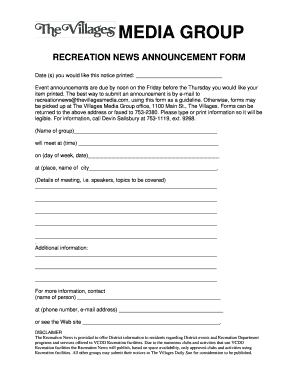
Ld like your item printed. The best way to submit an announcement is by e-mail to recreationnews@thevillagesmedia.com, using this form as a guideline. Otherwise, forms may be picked up at The Villages Media Group office, 1100 Main St., The Villages. Forms can be returned to the above address or faxed to 753-2380. Please type or print information so it will be legible. For information, call Devin Salisbury at 753-1119, ext. 9268. (Name of group)________________________________________________ wil.

How it works

  1. Open form

    Open form follow the instructions

  2. Easily sign form

    Easily sign the form with your finger

  3. Share form

    Send filled & signed form or save

How to fill out the Media Group Recreation News Announcement Form online

Filling out the Media Group Recreation News Announcement Form online is a straightforward process designed to help you announce events efficiently. This guide provides detailed, step-by-step instructions to assist you in submitting your event announcement accurately.

Follow the steps to complete the form effectively.

  1. Click ‘Get Form’ button to obtain the form and open it in the editor.
  2. Begin by entering the date(s) for which you would like the notice printed. Ensure you provide this information clearly, as announcements are due by noon on the Friday prior to the Thursday of printing.
  3. In the next section, enter the name of your group. This identifies the organizer of the event.
  4. Specify the time of the event by filling in the designated space. Being precise with time helps avoid any confusion.
  5. Indicate the day of the week and date of your event. This is crucial for the readers to plan their attendance.
  6. Provide the location of the event, ensuring to include the name of the city. This detail is important for potential attendees.
  7. Detail the content of your meeting in the provided text area. This may include topics, speakers, or any pertinent information that attendees should know.
  8. Use the additional information section to add any other relevant details that do not fit in the previous sections.
  9. Finally, fill out the contact information for a person who can be reached regarding the event. Include their name, phone number, and email address.
  10. Once all fields are completed, review your input for accuracy. Save your changes, and consider downloading, printing, or sharing the form as necessary.

Get started on filling out the Media Group Recreation News Announcement Form online today!

Get form

Experience a faster way to fill out and sign forms on the web. Access the most extensive library of templates available.
Get form

Related content

Press Release Template, Sample and Tips
Think about what will be interesting to the media and their respective audiences. Keep the...
Learn more
Submit News
Please submit news as early as possible (preferably at least three weeks ahead of the...
Learn more
Talk:Wikimedia MA User Group - Meta-Wiki
... news or social media channels with the wider movement. When new reports are available...
Learn more

Related links form

White Glove Placement Full Application Storage Battery Maintenance And Principles - Bureau Of Reclamation - Usbr Import / Export Permit - Georgia DNR Law Enforcement Division Out Processing Questionnaire Fort Riley 2020

Questions & Answers

Get answers to your most pressing questions about US Legal Forms API.

Contact support

A press release usually contains several components: a catchy headline, a compelling lead paragraph, detailed body content, a boilerplate about your organization, and contact details. Each component serves to convey crucial information clearly and effectively. The Media Group Recreation News Announcement Form can assist you in including all essential elements in your press release, helping you communicate your news successfully.

The format of a news release typically includes the following: a headline, dateline, lead paragraph, body, and contact information. It is essential to maintain a clean and professional structure to facilitate easy reading. Utilizing the Media Group Recreation News Announcement Form provides a comprehensive format that helps you present your news effectively.

To write a media release statement, start by clearly stating the news you want to share. Keep it concise and informative, focusing on the who, what, when, where, and why of your announcement. By using the Media Group Recreation News Announcement Form, you can organize your thoughts and ensure your statement adheres to industry standards.

The 5 W's in a press release are who, what, when, where, and why. These elements provide fundamental context and clarity regarding your announcement. The Media Group Recreation News Announcement Form helps you easily organize and present the 5 W's in a structured way, ensuring your message resonates with your audience.

Writing a press release can be simplified into seven steps: define your news, gather relevant facts, outline your press release, write a compelling headline, develop the body, include a boilerplate, and finalize with contact information. Following these steps will make your press release more compelling. With the Media Group Recreation News Announcement Form, you can streamline these steps for your next big announcement.

A typical press release consists of seven key parts: the headline, subheadline, dateline, lead paragraph, body paragraphs, boilerplate, and contact information. Each section serves a critical role in effectively conveying your message. Utilizing the Media Group Recreation News Announcement Form can help ensure that all components are included and formatted properly for maximum impact.

When sending a press release, ensure you introduce your organization and provide key information about the announcement. Clearly state the purpose of the press release and any relevant details that capture attention. Mention how the Media Group Recreation News Announcement Form can enhance this process by presenting your news in a structured manner.

The best way to submit a news release to the media is to identify the right journalists and outlets that align with your announcement. Use email for direct submissions, ensuring your subject line is captivating and relevant. Additionally, leveraging press release distribution services can maximize your reach, making the Media Group Recreation News Announcement Form easier to disseminate.

Organizing a press release involves several key steps, starting with a catchy headline followed by an engaging lead. Then, provide detailed information in the body, ensuring it flows logically and includes quotes or statistics as necessary. Conclude with a brief about the organization and the contact information to enhance the effectiveness of your Media Group Recreation News Announcement Form.

Formatting a news release correctly is crucial for readability and professionalism. Start with a header that includes your logo, date, and contact information. Use clear headings and subheadings, keep paragraphs short, and ensure there is adequate spacing. Following this format can enhance the impact of your Media Group Recreation News Announcement Form.

Get This Form Now!

Use professional pre-built templates to fill in and sign documents online faster. Get access to thousands of forms.
Get form
If you believe that this page should be taken down, please follow our DMCA take down processhere.
Get Media Group Recreation News Announcement Form
Get form
  • Adoption
  • Bankruptcy
  • Contractors
  • Divorce
  • Home Sales
  • Employment
  • Identity Theft
  • Incorporation
  • Landlord Tenant
  • Living Trust
  • Name Change
  • Personal Planning
  • Small Business
  • Wills & Estates
  • Packages A-Z
  • Affidavits
  • Bankruptcy
  • Bill of Sale
  • Corporate - LLC
  • Divorce
  • Employment
  • Identity Theft
  • Internet Technology
  • Landlord Tenant
  • Living Wills
  • Name Change
  • Power of Attorney
  • Real Estate
  • Small Estates
  • Wills
  • All Forms
  • Forms A-Z
  • Other Templates
  • Legal Hub
  • About Us
  • Help Portal
  • Legal Resources
  • Blog
  • Affiliates
  • Contact Us
  • Delete My Account
  • Site Map
  • Industries
  • Forms in Spanish
  • Localized Forms
  • State-specific Forms
  • Forms Kit
  • Real Estate Handbook
  • All Guides
  • Notarize
  • Incorporation services
  • For Consumers
  • For Small Business
  • For Attorneys
  • USLegal
  • FormsPass
  • pdfFiller
  • signNow
  • altaFlow
  • DocHub
  • Instapage
Form Packages
  • Adoption
  • Bankruptcy
  • Contractors
  • Divorce
  • Home Sales
  • Employment
  • Identity Theft
  • Incorporation
  • Landlord Tenant
  • Living Trust
  • Name Change
  • Personal Planning
  • Small Business
  • Wills & Estates
  • Packages A-Z
Form Categories
  • Affidavits
  • Bankruptcy
  • Bill of Sale
  • Corporate - LLC
  • Divorce
  • Employment
  • Identity Theft
  • Internet Technology
  • Landlord Tenant
  • Living Wills
  • Name Change
  • Power of Attorney
  • Real Estate
  • Small Estates
  • Wills
  • All Forms
  • Forms A-Z
  • Other Templates
Customer Service
  • Legal Hub
  • About Us
  • Help Portal
  • Legal Resources
  • Blog
  • Affiliates
  • Contact Us
  • Delete My Account
  • Site Map
  • Industries
  • Forms in Spanish
  • Localized Forms
  • State-specific Forms
  • Forms Kit
Legal Guides
  • Real Estate Handbook
  • All Guides
Prepared for you
  • Notarize
  • Incorporation services
Our Customers
  • For Consumers
  • For Small Business
  • For Attorneys
Our Sites
  • USLegal
  • FormsPass
  • pdfFiller
  • signNow
  • altaFlow
  • DocHub
  • Instapage
Social Media
Call us now toll free:
+1 833 426 79 33
As seen in:
© Copyright 1999-2026 airSlate Legal Forms, Inc. 17 Station Street, Ste. 203, Brookline, MA 02445
  • Your Privacy Choices
  • Terms of Service
  • Privacy Notice
  • Content Takedown Policy
  • Bug Bounty Program