Loading
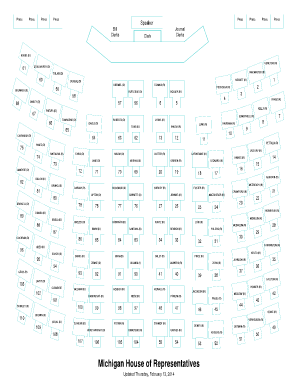
Get House Chamber Seating Chart
How it works
-

Open form follow the instructions
-

Easily sign the form with your finger
-

Send filled & signed form or save
How to fill out the House Chamber Seating Chart online
This guide provides clear instructions on filling out the House Chamber Seating Chart online. Whether you are a first-time user or need a refresher, this comprehensive approach will assist you in navigating the form effectively.
Follow the steps to complete the House Chamber Seating Chart online.
- Click the ‘Get Form’ button to access the form and open it in your preferred online editor.
- Review the sections of the seating chart that designate specific areas for House members. Familiarize yourself with the layout to understand where to place information accurately.
- Identify the fields that require input, such as the names of House members and their corresponding seating numbers. Ensure that you enter each name accurately, corresponding to their designated position.
- Double-check the information entered to confirm that all names and numbers match the required format.
- Once you have completed all fields, you can save changes to the document, download it for offline access, print for physical records, or share it with relevant parties.
Take the next step in digital document management by filling out the House Chamber Seating Chart online today.
United States SenateSeats100Political groupsMajority (51) Democratic (48) Independent (3) Minority (49) Republican (49)Length of term6 yearsElections29 more rows
Industry-leading security and compliance
US Legal Forms protects your data by complying with industry-specific security standards.
-
In businnes since 199725+ years providing professional legal documents.
-
Accredited businessGuarantees that a business meets BBB accreditation standards in the US and Canada.
-
Secured by BraintreeValidated Level 1 PCI DSS compliant payment gateway that accepts most major credit and debit card brands from across the globe.