Loading
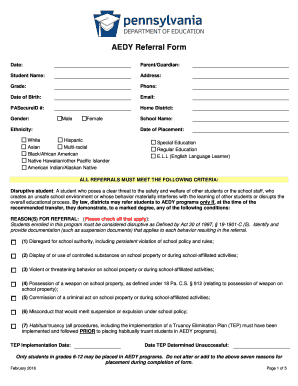
Get Alternative Education For Disruptive Youth Aedy Referral Intake Form
How it works
-

Open form follow the instructions
-

Easily sign the form with your finger
-

Send filled & signed form or save
How to fill out the Alternative Education For Disruptive Youth AEDY Referral Intake Form online
Filling out the Alternative Education For Disruptive Youth AEDY Referral Intake Form online can streamline the process of enrolling a disruptive student into an appropriate educational program. This guide provides clear, step-by-step instructions for completing the form effectively.
Follow the steps to complete the AEDY referral intake form online.
- Click the ‘Get Form’ button to obtain the form and open it in the online editor.
- Begin by entering the date at the top of the form, which helps track when the referral is initiated.
- Fill in the Parent/Guardian details, including their name and contact information. This information is vital for communication and further discussions.
- Provide the Student Name, Address, Grade, and Phone number. Ensure all information is accurate to prevent delays in processing.
- Input the Student’s Date of Birth and Email. This data is important for identification purposes.
- Input the PASecureID number and Home District. These identifiers help facilitate the student’s transition.
- Choose the Gender designation for the student. Options include Male, Female, or choose not to specify.
- Select the Ethnicity from the provided options to ensure proper demographic documentation.
- Enter the School Name and Date of Placement, indicating where the student will be transferred.
- Check all applicable reasons for referral in the criteria section. Ensure you provide clear documentation for each reason selected.
- Document the implementation date of the Truancy Elimination Plan (TEP) if relevant, along with the date when the TEP was determined unsuccessful.
- Complete the intervention sheet by detailing all three levels of interventions (Administrative, Guidance Referral, and SAP Referral), including dates and notes.
- Confirm that the informal hearing has been scheduled and provide the date, time, and location.
- Document the results of the informal hearing, including decisions on whether the student will be placed in the AEDY program or remain in their home school.
- Ensure all mandatory signatures are obtained (School Counselor, Principal, Parent, and Student) before finalizing the form.
- Review the checklist/verification section to confirm that all required documents and attachments are completed and attached.
- Once all fields are filled, save changes to the document. You can also choose to download, print, or share the completed form as needed.
Take action now by filling out the AEDY referral intake form online to support educational pathways for students in need.
The TxVSN is made up of two components: the TxVSN statewide course catalog, which provides supplemental online courses to students in grades 8-12; and the TxVSN online schools program, which offers full-time virtual instruction through eligible public schools to Texas public school students in grades 3-12.
Industry-leading security and compliance
US Legal Forms protects your data by complying with industry-specific security standards.
-
In businnes since 199725+ years providing professional legal documents.
-
Accredited businessGuarantees that a business meets BBB accreditation standards in the US and Canada.
-
Secured by BraintreeValidated Level 1 PCI DSS compliant payment gateway that accepts most major credit and debit card brands from across the globe.