Loading
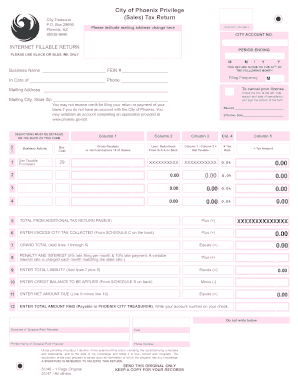
Get City Of Phoenix Tpt
How it works
-

Open form follow the instructions
-

Easily sign the form with your finger
-

Send filled & signed form or save
How to fill out the City Of Phoenix Tpt online
Filing the City Of Phoenix privilege (sales) tax return can seem daunting, but with a clear understanding of the form's components, the process can be straightforward. This guide will help you navigate through each section of the form online, ensuring that you complete it accurately and efficiently.
Follow the steps to successfully complete your City Of Phoenix Tpt return.
- Click ‘Get Form’ button to obtain the form and open it in the editor.
- Begin by entering your business name and Federal Employer Identification Number (FEIN) at the top of the form. This information is crucial for establishing your account with the City of Phoenix.
- Indicate any mailing address changes as required in the designated section. Include your city, state, and zip code accurately.
- Fill in the reason for your return along with the effective date. This information is vital for the city's records.
- Complete the gross receipts or jet fuel gallons information in the designated columns. Be sure to include all relevant receipts as they will form the basis of your tax calculations.
- List any deductions in column two from Schedule A at the back of the form. Ensure that you detail each deduction correctly as per applicable business classifications.
- Calculate your net taxable amount by subtracting deductions from gross receipts in the designated calculation area. Multiply the net taxable amount by the tax rate to determine the tax amount due.
- If applicable, enter any use taxable purchases and check the box for cancellation if you are cancelling your license. Note the reason and cancellation date.
- Review the total amounts from the additional return pages and ensure the grand total is accurate. Add any excess tax collected as outlined in Schedule C.
- Sign and date the form at the bottom to validate your return. Ensure that the printed name of the taxpayer or paid preparer is included.
- Once everything is filled out, you can save your changes, download the form, or print it for your records. Share it if needed before mailing it to the address provided.
Complete your City Of Phoenix Tpt online today to ensure timely and accurate filing.
Although commonly referred to as a sales tax, the Arizona transaction privilege tax (TPT) is actually a tax on a vendor for the privilege of doing business in the state. Various business activities are subject to transaction privilege tax and must be licensed.
Industry-leading security and compliance
US Legal Forms protects your data by complying with industry-specific security standards.
-
In businnes since 199725+ years providing professional legal documents.
-
Accredited businessGuarantees that a business meets BBB accreditation standards in the US and Canada.
-
Secured by BraintreeValidated Level 1 PCI DSS compliant payment gateway that accepts most major credit and debit card brands from across the globe.