Loading
Form preview
  • US Legal Forms
  • Form Library
  • More Forms
  • More Multi-State Forms
  • Canada Pension Plan T4a

Get Canada Pension Plan T4a

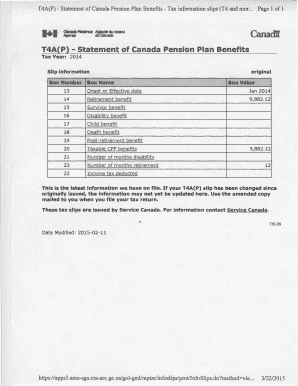
T4A(P) Statement of Canada Pension Plan Benefits Tax information slips (T4 and mor... Page 1 of 1T4A P Statement of Canada Pension Plan Benefits Tax Year: 2014 Slip information Box NumberoriginalBox.

How it works

  1. Open form

    Open form follow the instructions

  2. Easily sign form

    Easily sign the form with your finger

  3. Share form

    Send filled & signed form or save

How to fill out the Canada Pension Plan T4a online

Filling out the Canada Pension Plan T4a form online is essential for reporting pension benefits accurately. This guide provides a step-by-step approach to ensure all relevant sections of the form are completed correctly.

Follow the steps to successfully complete the Canada Pension Plan T4a online.

  1. Click ‘Get Form’ button to obtain the form and open it in an online editor.
  2. In the 'Slip information' section, enter the tax year. For example, '2014' is typically used if you are filling out the form for that year.
  3. Fill in the recipient's name and address in the boxes provided, ensuring to enter them accurately for proper identification.
  4. For Box 13, indicate the onset or effective date of the pension benefits, e.g., 'January 2014'.
  5. In Box 14, report the total amount of retirement benefits received, a figure which could resemble '9,882.12'.
  6. If applicable, complete Box 15 for any survivor benefits received, and continue through Boxes 16 to 19 for disability, child, and death benefits as necessary.
  7. Complete Box 20 to report the total taxable CPP benefits received and Box 22 to indicate the amount of income tax deducted.
  8. Once all necessary fields are filled, ensure to review the information for accuracy before proceeding to save.
  9. After verifying, you can choose to save the changes, download the completed form, print it, or share it as needed.

Complete your Canada Pension Plan T4a form online today to ensure timely tax reporting!

Get form

Experience a faster way to fill out and sign forms on the web. Access the most extensive library of templates available.
Get form

Related content

Publication 597 (10/2015), Information on the...
U.S. social security benefits paid to a resident of Canada are taxed in Canada as if they...
Learn more
Understand how taxes work in Canada and get a SIN...
each pay cheque for Canada Pension Plan (CPP) and Employment Insurance (EI). ... T4A: Any...
Learn more
Old Age Security - Wikipedia
The Old Age Security (OAS) program is a universal retirement pension available to most...
Learn more

Related links form

2010 Official Nomination Form Scott Mecham BBB Student Integrity Awards Official Entry Form Silent Auction Donor Form

Questions & Answers

Get answers to your most pressing questions about US Legal Forms API.

Contact support

What exactly is a T4 slip? Its official title is a “T4 Statement of Remuneration Paid” form, though most Canadians just refer to it as a T4 slip. No matter what you call it, the T4 is a tax document that summarizes how much you've earned over the past year.

To access your tax slips online, you must register or sign in to in My Service Canada Account (MSCA). Once registered or signed in, from the MSCA homepage select “Employment Insurance” or "Canada Pension Plan/Old Age Security." Then: go to “Tax information”

The T4A is a Statement of Pension, Retirement, Annuity, and Other Income. If you have received any self-employment income throughout the past year, you report it as a T4A vs. T4. While the T4 and T4A slips may seem similar, the T4 includes more detail around various payroll contributions that you have as an employee.

The T4A is a Statement of Pension, Retirement, Annuity, and Other Income. If you have received any self-employment income throughout the past year, you report it as a T4A vs. T4. While the T4 and T4A slips may seem similar, the T4 includes more detail around various payroll contributions that you have as an employee.

If you receive Canadian retirement or pension benefits while living in the US, you should report them on form 1040 or a 1040A (depending on which one you're filing). Enter this income on the line where US social security benefits are reported.

W2 Form – Wage & Tax Statement Canadian Equivalent is T4 slip. W2 form is issued to anyone that is employed in the USA, residents or non-residents. Employment income will be issued on the T4 and your residency status will be indicated in box 10 (as “zz”).

Generally, you need to complete a T4A slip if you are a payer of other amounts related to employment, or a payer of other amounts to a self employed business, professional or other entity (an independent worker who is not an employee), relating to a contract for services.

Get This Form Now!

Use professional pre-built templates to fill in and sign documents online faster. Get access to thousands of forms.
Get form
If you believe that this page should be taken down, please follow our DMCA take down processhere.

Industry-leading security and compliance

US Legal Forms protects your data by complying with industry-specific security standards.
  • In businnes since 1997
    25+ years providing professional legal documents.
  • Accredited business
    Guarantees that a business meets BBB accreditation standards in the US and Canada.
  • Secured by Braintree
    Validated Level 1 PCI DSS compliant payment gateway that accepts most major credit and debit card brands from across the globe.
Get Canada Pension Plan T4a
Get form
  • Adoption
  • Bankruptcy
  • Contractors
  • Divorce
  • Home Sales
  • Employment
  • Identity Theft
  • Incorporation
  • Landlord Tenant
  • Living Trust
  • Name Change
  • Personal Planning
  • Small Business
  • Wills & Estates
  • Packages A-Z
  • Affidavits
  • Bankruptcy
  • Bill of Sale
  • Corporate - LLC
  • Divorce
  • Employment
  • Identity Theft
  • Internet Technology
  • Landlord Tenant
  • Living Wills
  • Name Change
  • Power of Attorney
  • Real Estate
  • Small Estates
  • Wills
  • All Forms
  • Forms A-Z
  • Form Library
  • Legal Hub
  • About Us
  • Help Portal
  • Legal Resources
  • Blog
  • Affiliates
  • Contact Us
  • Delete My Account
  • Site Map
  • Industries
  • Forms in Spanish
  • Localized Forms
  • State-specific Forms
  • Forms Kit
  • Real Estate Handbook
  • All Guides
  • Notarize
  • Incorporation services
  • For Consumers
  • For Small Business
  • For Attorneys
  • USLegal
  • FormsPass
  • pdfFiller
  • signNow
  • altaFlow
  • DocHub
  • Instapage
Form Packages
  • Adoption
  • Bankruptcy
  • Contractors
  • Divorce
  • Home Sales
  • Employment
  • Identity Theft
  • Incorporation
  • Landlord Tenant
  • Living Trust
  • Name Change
  • Personal Planning
  • Small Business
  • Wills & Estates
  • Packages A-Z
Form Categories
  • Affidavits
  • Bankruptcy
  • Bill of Sale
  • Corporate - LLC
  • Divorce
  • Employment
  • Identity Theft
  • Internet Technology
  • Landlord Tenant
  • Living Wills
  • Name Change
  • Power of Attorney
  • Real Estate
  • Small Estates
  • Wills
  • All Forms
  • Forms A-Z
  • Form Library
Customer Service
  • Legal Hub
  • About Us
  • Help Portal
  • Legal Resources
  • Blog
  • Affiliates
  • Contact Us
  • Delete My Account
  • Site Map
  • Industries
  • Forms in Spanish
  • Localized Forms
  • State-specific Forms
  • Forms Kit
Legal Guides
  • Real Estate Handbook
  • All Guides
Prepared for you
  • Notarize
  • Incorporation services
Our Customers
  • For Consumers
  • For Small Business
  • For Attorneys
Our Sites
  • USLegal
  • FormsPass
  • pdfFiller
  • signNow
  • altaFlow
  • DocHub
  • Instapage
Social Media
Call us now toll free:
+1 833 426 79 33
As seen in:
© Copyright 1999-2026 airSlate Legal Forms, Inc. 3720 Flowood Dr, Flowood, Mississippi 39232
  • Your Privacy Choices
  • Terms of Service
  • Privacy Notice
  • Content Takedown Policy
  • Bug Bounty Program