Loading
Get How To Register With Kansas.okta
How it works
-

Open form follow the instructions
-

Easily sign the form with your finger
-

Send filled & signed form or save
How to fill out the How To Register With Kansas.Okta online
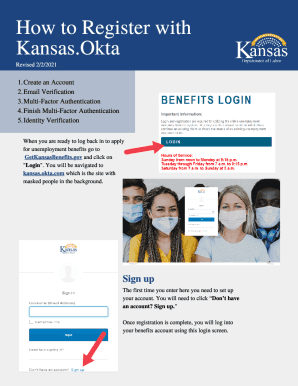
This guide provides detailed, step-by-step instructions on how to successfully register with Kansas.Okta online. By following these clear steps, users will be able to create and secure their accounts effectively.
Follow the steps to successfully register your account.
- Click 'Get Form' button to obtain the registration form and start filling it out.
- Create an account by providing your email, ensuring it is unique, and set a secure password that meets all listed criteria including length, numbers, and symbols.
- Enter your legal first name, last name, and optionally, your middle initial and display name. Provide your primary phone number and street address, along with the city, state, and zip code.
- Input your Social Security Number (SSN) as a 9-digit number and your date of birth in the format mm/dd/yyyy. Choose a security word and create a 4-digit PIN number, ensuring it does not consist of all 0's or 9's.
- After submitting your information, check your email for a verification message from 'KDOL Benefits'. Click on the 'Activate Account' button within the email to verify your account.
- Set up multi-factor authentication (MFA) for additional security. Click 'Configure Factor' to select your preferred method of authentication, such as voice call, SMS, or email.
- Once MFA is set up, you may be required to complete an identity verification questionnaire provided by LexisNexis. Answer the questions presented and click the 'Verify' button.
- If verification fails, contact the LexisNexis Help Desk at 1-800-343-2778 for further assistance, or reach out to the KDOL Unemployment Contact Center at 1-800-292-6333 for questions about the registration process.
- Upon successful registration, you will access your claimant dashboard from where you can manage your claims and account settings.
Begin your registration with Kansas.Okta online to access unemployment benefits today.
To set up Okta Verify on your Android device for the first time, go to your computer and sign in to your organization's Okta End-User Dashboard. Follow the instructions to obtain a QR code. Then download and Okta Verify on your device, and scan the QR code displayed on the computer.
Industry-leading security and compliance
US Legal Forms protects your data by complying with industry-specific security standards.
-
In businnes since 199725+ years providing professional legal documents.
-
Accredited businessGuarantees that a business meets BBB accreditation standards in the US and Canada.
-
Secured by BraintreeValidated Level 1 PCI DSS compliant payment gateway that accepts most major credit and debit card brands from across the globe.