Loading
Get Medical History Chart - Healthylearncom
How it works
-

Open form follow the instructions
-

Easily sign the form with your finger
-

Send filled & signed form or save
How to fill out the Medical History Chart - Healthylearncom online
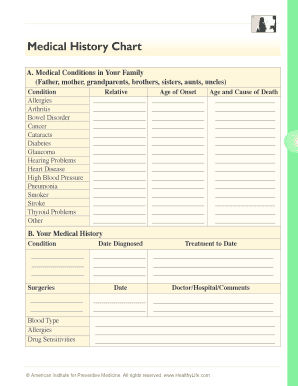
Completing the Medical History Chart is an essential step in managing your health information. This guide provides a comprehensive overview of how to accurately fill out the form online, ensuring all relevant details are captured for your medical records.
Follow the steps to complete your Medical History Chart effectively.
- Click ‘Get Form’ button to obtain the document and open it in the designated editor.
- Begin by entering information about medical conditions in your family. Document any relevant conditions such as allergies, diabetes, heart disease, or cancer next to each corresponding relative.
- Indicate the age of onset for each condition listed and provide the age and cause of death for deceased relatives, where applicable.
- Next, proceed to your medical history section. Fill in your medical conditions, any surgeries you have undergone, and indicate your blood type.
- List any known allergies and drug sensitivities, along with the dates these conditions were diagnosed.
- In the treatment section, provide details regarding any current treatment you have received to date, including the names of doctors or hospitals involved.
- Carefully review all the information to ensure accuracy and completeness before finalizing your form.
- At the end of the process, you can save your changes, download the completed form, print it for your records, or share it as necessary.
Ensure that your health information is complete—start filling out your Medical History Chart online today!
Being able to understand these types of patients and finding ways to work with them is essential to building a healthcare worker/patient relationship. There are 3 patients that you are sure to see in your career – the inconsistent patient, the anxious patient, and the quiet patient.