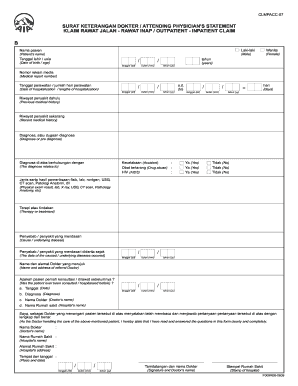
CLMPACC-07 SURAT KETERANGAN DOKTER / ATTENDING PHYSICIAN S STATEMENT KLAIM RAWAT JALAN - RAWAT INAP / OUTPATIENT - INPATIENT CLAIM B Laki-laki Nama pasien Wanita Male Patient s name Tanggal lahir / usia / Date of birth / age tanggal dd tahun bulan mm Female years Nomor rekam medis Medical report number Tanggal perawatan / jumlah hari perawatan Date of hospitalization / lengths of hospitalization s. d. to hari days Riwayat penyakit dahulu Previous medical history Recent medical history Diagnosa atau dugaan diagnosa Diagnose or pre diagnose Diagnosa di atas berhubungan dengan Kecelakaan Accident Obat terlarang Drug abuse HIV AIDS The diagnose relates to Ya Yes Tidak No Jenis serta hasil pemeriksaan fisik lab rontgen USG CT scan Patologi Anatomi dll Physical exam result lab X ray USG CT scan Pathology Anatomy etc Terapi atau tindakan Therapy or treatment Penyebab / penyakit yang mendasari Cause / underlying disease The date of the caused / underlying diseases occured Nama dan alamat Dokte....
Open form follow the instructions
Easily sign the form with your finger
Send filled & signed form or save
How to fill out the ID CLMPACC-07 online
The ID CLMPACC-07 form, also known as the attending physician's statement for outpatient and inpatient claims, is a vital document for healthcare providers and patients alike. This guide offers a clear, step-by-step process to assist you in accurately completing the form online.
Follow the steps to complete the ID CLMPACC-07 form online.
- Click the ‘Get Form’ button to access the form and open it in your preferred online editor.
- Enter the patient's name in the designated field under 'Nama pasien (Patient’s name)'.
- Fill in the patient's date of birth and age by selecting the appropriate day, month, and year in the 'Tanggal lahir / usia' section.
- Provide the medical record number in the corresponding field labeled 'Nomor rekam medis (Medical report number)'.
- Record the date of hospitalization and the total number of days of hospitalization under 'Tanggal perawatan / jumlah hari perawatan'. You will need to enter the start and end dates.
- Complete the medical history sections by describing the patient's previous medical history ('Riwayat penyakit dahulu') and recent medical history ('Riwayat penyakit sekarang').
- Indicate the diagnosis or pre-diagnosis in the field provided under 'Diagnosa, atau dugaan diagnosa'.
- Select the appropriate options relating to the diagnosis, such as 'Kecelakaan', 'Obat terlarang', and 'HIV', marking 'Ya' (Yes) or 'Tidak' (No) as applicable.
- Detail any physical examination results or tests carried out in 'Jenis serta hasil pemeriksaan'. Include information about lab tests, imaging, and other relevant assessments.
- Outline the therapy or treatment administered in the 'Terapi atau tindakan' section.
- State the underlying cause or disease in 'Penyebab / penyakit yang mendasari', including the date this condition first occurred.
- Fill in the name and address of the referral doctor in the relevant fields.
- Answer the question regarding previous consultations or hospitalizations by providing dates, diagnoses, and the names of doctors and hospitals where applicable.
- As the attending doctor, confirm the accuracy of the responses by signing the form, including filling in your name, hospital details, and the date. Ensure the hospital stamp is also included.
- After completing the form, save your changes, then download, print, or share the completed document as necessary.
Start filling out your ID CLMPACC-07 form online today to ensure accurate claims processing.
Experience a faster way to fill out and sign forms on the web. Access the most extensive library of templates available.
Related content
North is one of the four compass points or cardinal directions. It is the opposite of...
Get answers to your most pressing questions about US Legal Forms API.
What is the use of an RFID ID card?
An RFID ID card is primarily used for secure access control and identification purposes. It simplifies processes in places like airports, offices, and events, allowing easy entry with a quick scan. This technology significantly enhances security and reduces the likelihood of identity theft. Find more information about this in the ID CLMPACC-07.
What is the RFID chip on my ID?
The RFID chip on your ID is a technology that enables radio frequency identification. This chip contains your essential information and allows for quick scans without physical contact. It plays a vital role in modernizing how IDs are used in travel, security, and identification processes. For detailed insights, visit ID CLMPACC-07.
What is the purpose of the chip on the ID card?
The chip on your ID card serves to securely store and transmit your personal information. It facilitates quick and accurate identification by allowing scanners to read your data seamlessly. This enhances convenience and safety in various environments where ID verification is essential. Explore the ID CLMPACC-07 to understand its significance further.
What is the electronic version of ID?
The electronic version of an ID is often a digital representation of your physical identification. This electronic ID can be accessed through mobile devices and may include features like biometric verification. It provides a convenient way to prove your identity while enhancing security. The ID CLMPACC-07 details how electronic IDs are shaping the future of identification.
Why is there a microchip in my ID card?
The microchip in your ID card serves multiple important functions. It securely holds your personal information and ensures that your identity is easily verifiable. This technology helps reduce fraud and enhances the safety of your identification. By utilizing the ID CLMPACC-07, you can learn more about the benefits of microchips in modern IDs.
Does real ID have an RFID chip?
Yes, the Real ID often includes an RFID chip. This chip can store information securely and allows for contactless scanning. By using this technology, authorities can quickly verify your identity in various situations. The ID CLMPACC-07 provides you with insights on how this feature enhances security and convenience.
What is the format of tax ID number?
A tax ID number can come in several formats based on its classification as an SSN or EIN. The EIN format typically consists of nine digits in the form of XX-XXXXXXX, while an SSN follows the XXXXXX-XXXX format. USLegalForms offers valuable tools that simplify understanding these formats, ensuring accurate compliance under ID CLMPACC-07.
What is the correct format for tax ID?
The correct format for a tax ID also depends on the type you are dealing with. Generally, it's either a Social Security Number (SSN) or an Employer Identification Number (EIN), both formatted with numerical precision. For clarity and compliance with ID CLMPACC-07, USLegalForms offers expert resources that explain tax ID formats in detail.
How do I fill out an EIN number?
To fill out an EIN number, you need to provide specific information about your business entity, such as its structure, address, and the responsible party. The application requires accuracy to avoid processing delays. USLegalForms can guide you through this simple process to help you secure your EIN efficiently and correctly.
How to fill out EZ tax form?
Filling out an EZ tax form involves understanding your income, deductions, and credits. Start by gathering your financial documents, then ensure you accurately report your income and select the appropriate deductions. If you need assistance, USLegalForms provides a straightforward approach to completing the EZ tax form, aligning with ID CLMPACC-07 specifications.
Use professional pre-built templates to fill in and sign documents online faster. Get access to thousands of forms.
If you believe that this page should be taken down, please follow our DMCA take down process here.