Loading
Get Aenta Gr-69140 2017-2026
How it works
-

Open form follow the instructions
-

Easily sign the form with your finger
-

Send filled & signed form or save
How to fill out the AENTA GR-69140 online
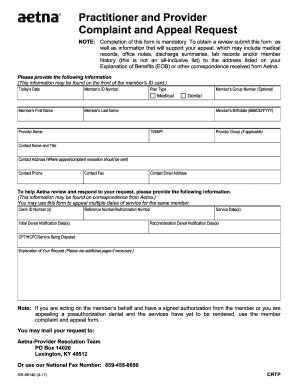
Completing the AENTA GR-69140 form online is essential for submitting complaints and appeals to Aetna. This guide provides a clear, step-by-step approach to ensure that users can accurately fill out the form and submit it effectively.
Follow the steps to successfully complete the AENTA GR-69140 form.
- Press the ‘Get Form’ button to access the AENTA GR-69140 form and open it for further editing.
- Enter the current date in the designated field for 'Today’s Date'.
- Locate and input the member's ID number that can be found on the front of the member’s ID card.
- Select the appropriate plan type from the available options provided.
- Fill in the member’s first name and last name in their respective fields.
- Input the provider's name in the designated section.
- Provide the member’s group number, if it is applicable, in the optional field.
- Enter the member’s date of birth in the required format (MM/DD/YYYY).
- Input the TIN/NPI of the provider.
- Specify the provider group, if applicable.
- Include the contact name and title of the person submitting the appeal.
- Fill in the contact address where the appeal or complaint resolution should be sent.
- Enter the contact phone number.
- Input the contact fax number, if relevant.
- Provide a contact email address for any follow-up communication.
- For the review and response, include the claim ID number(s) and reference number/authorization number, if available.
- List the initial denial notification dates and service dates connected to your appeal.
- If applicable, include the reconsideration denial notification dates.
- Specify the CPT/HCPC/service being disputed in the field provided.
- Clearly explain your request in the designated area; you may use additional pages if necessary.
- Review all information for accuracy before final submission.
- Once complete, save changes, and utilize options to download, print, or share the completed form.
Complete your documents online to ensure a smooth appeal process.