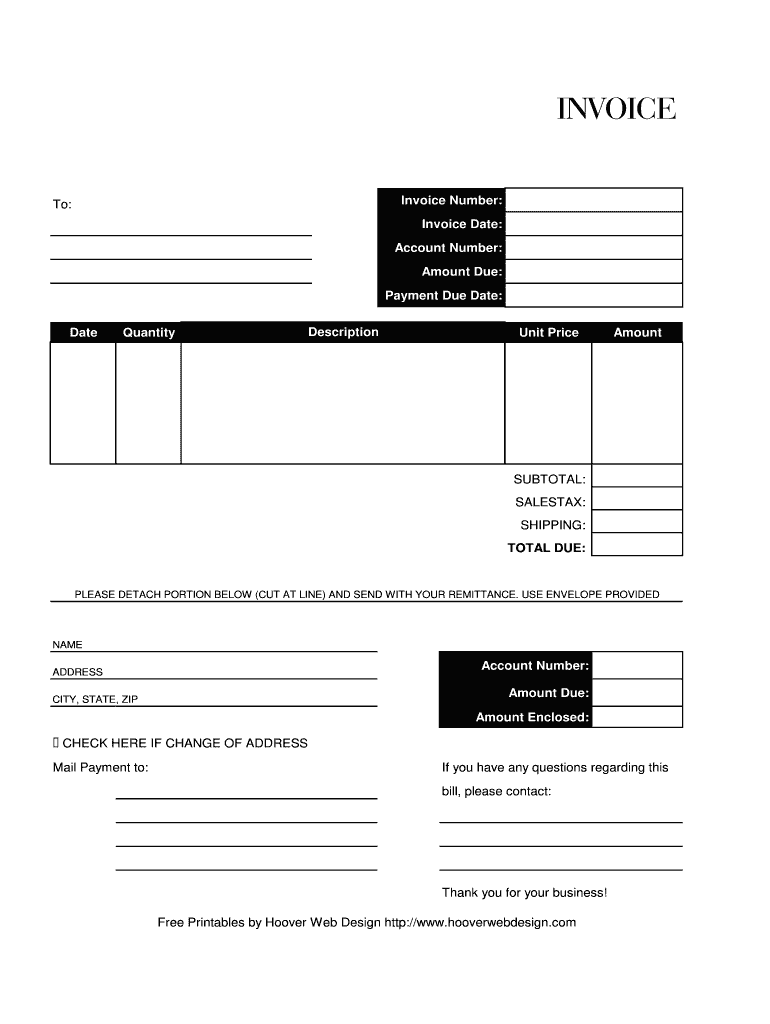
INVOICE Invoice Number: To: Invoice Date: Account Number: Amount Due: Payment Due Date: Date Quantity Description Unit Price Amount SUBTOTAL: SALESTAX: SHIPPING: TOTAL DUE: PLEASE DETACH PORTION BELOW.
Loading

Open form follow the instructions

Easily sign the form with your finger

Send filled & signed form or save
How to fill out the Hoover Web Design Invoice online
Filling out the Hoover Web Design Invoice online is a straightforward process that ensures accurate billing and payment tracking. This guide will walk you through each component of the invoice, providing detailed instructions to assist you effectively.
Follow the steps to complete the online invoice.
- Click ‘Get Form’ button to obtain the form and open it in the editor.
- Begin by entering the invoice number in the designated field. This is a unique identifier for your invoice, helping to track payments and communications.
- In the 'To:' section, input the name of the individual or business you are invoicing.
- Fill in the invoice date. This is the date on which the invoice is being issued.
- Next, provide the account number associated with the billing. This helps in managing and referencing the account accurately.
- In the 'Amount Due:' field, indicate the total amount that is owed on this invoice.
- Specify the payment due date. This informs the recipient when the payment is expected.
- Proceed to the detailed breakdown of the charges. In the 'Quantity' field, enter the number of items or services provided.
- In the 'Description' section, describe the goods or services rendered to provide clarity.
- Enter the unit price for each item in the 'Unit Price' field, which will calculate the total for each line in the invoice.
- The 'Amount' field will automatically calculate based on the quantity and unit price you previously entered.
- Review the 'Subtotal:' which sums all the amounts, followed by adding 'Sales Tax' if applicable.
- If applicable, include 'Shipping' costs to the total.
- Review the 'Total Due:' field, ensuring it reflects the correct total amount, including any taxes or shipping.
- Finally, save the changes you made. You can then download, print, or share the completed invoice as needed.
Complete your invoices online for efficiency and accuracy today.
Experience a faster way to fill out and sign forms on the web. Access the most extensive library of templates available.
Related content
Hoover Sewer Adjustment Request. Please also submit a copy of your invoice from the...
Transaction specifics (date, time, invoice number). 2. Itemized list of products/services...
Apr 6, 2020 — You will need the 16-digit control number included on your Notice of...
Get answers to your most pressing questions about US Legal Forms API.
How to invoice for web development?
When invoicing for web development through a Hoover Web Design Invoice, make sure to outline your project phases. Provide specific details regarding each phase, including deliverables and timelines. Include the respective charges for each phase, and sum them up accordingly to maintain transparency with your client.
How do I create my own invoice?
To create your own Hoover Web Design Invoice, you can use templates available online or design your own layout. Begin by putting your business information at the top, followed by the client’s details. Clearly list the services, their respective prices, and any additional fees. Make sure to include a clear total amount to keep your client informed.
How to write a design invoice?
To write a Hoover Web Design Invoice, begin by clearly detailing your services. Include your business name, client information, and invoice date. Next, list all services provided along with their prices, and calculate the total amount due. Always remember to include payment terms to ensure clarity.
What is the correct format for an invoice?
The correct format for an invoice includes clear and organized sections, which you can easily achieve with the Hoover Web Design Invoice. Start with your business name and contact details at the top. Follow this with client information, an invoice number, the date, and a breakdown of services or products sold, including descriptions and prices. A well-structured format aids in clarity.
How to fill invoice details?
To fill invoice details effectively with the Hoover Web Design Invoice, cover all necessary information clearly. Include the name and contact details of your business and client, followed by an appropriate invoice number and date. Detail the goods or services provided, including descriptions and associated prices, to ensure transparency in your transaction.
How to fill an invoice in PDF?
Filling an invoice in PDF format can be easily done using the Hoover Web Design Invoice. Open the invoice template and fill in all necessary details such as business and client information, invoice number, and item descriptions. Once you have filled in the required fields, save the document as a PDF to maintain its format when sending to your client.
What details do you give for an invoice?
For an effective invoice like the Hoover Web Design Invoice, provide essential details that ensure clarity. Include your business name, address, and contact details, along with the client's name and address. Add an invoice number, the date of issue, descriptions of services or products, their prices, and the total amount due. These elements create a professional appearance.
How do you fill out a simple invoice?
To fill out a simple invoice using the Hoover Web Design Invoice, begin by selecting a basic template. Include your business and client details, along with an invoice number and date. Then, list the services or products along with prices and totals. Keep it simple; clarity is essential to make sure your client understands the charges.
How do you fill out an invoice details?
Filling out invoice details in the Hoover Web Design Invoice is straightforward. You should include your business name, address, and contact information. Next, list your client's details along with a unique invoice number and date. Make sure to provide clear descriptions and prices for each item to ensure transparency.
How do I create an invoice in studio designer?
To create an invoice in Studio Designer, begin by logging into your account and selecting the invoice feature. Enter your project information and service details directly into the template. Utilizing resources such as the Hoover Web Design Invoice may help you structure your invoice effectively. After all information is filled in, review thoroughly and send it to your client.
Use professional pre-built templates to fill in and sign documents online faster. Get access to thousands of forms.
If you believe that this page should be taken down, please follow our DMCA take down process here.