Loading
Get Az Dot 96-0236 2021-2026
How it works
-

Open form follow the instructions
-

Easily sign the form with your finger
-

Send filled & signed form or save
How to fill out the AZ DoT 96-0236 online
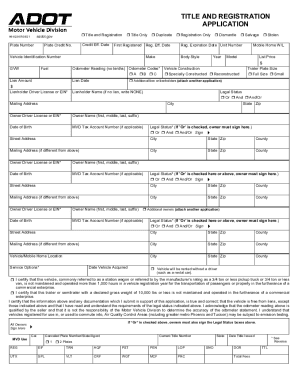
Filling out the AZ DoT 96-0236 form online is a straightforward process that enables users to register vehicles, apply for titles, and manage other related services. This guide provides step-by-step instructions to help you complete the form accurately and efficiently.
Follow the steps to successfully complete the AZ DoT 96-0236 online.
- Click the ‘Get Form’ button to obtain the form and open it in your preferred online editing tool.
- Begin by selecting the type of application you are submitting. Options include 'Title and Registration,' 'Title Only,' 'Duplicate,' 'Registration Only,' 'Dismantle,' or 'Salvage.' Be sure to check the appropriate box.
- Fill in the 'Vehicle Identification Number' (VIN) and 'Make' of your vehicle, followed by 'Body Style,' 'Year,' and 'Model.'
- Enter 'Odometer Reading' without tenths and select the corresponding 'Odometer Codes' (A, B, or C) to indicate the status of the odometer.
- If applicable, complete the 'Lienholder' section, indicating the amount of the lien, the lienholder's name, and the lien date. If there are no liens, write 'NONE.'
- Provide the 'Owner' information, including the owner's name, driver's license number or EIN, date of birth, and mailing address. Ensure that you fill out the same details for any additional owners.
- Select the 'Legal Status' by choosing between options 'Or,' 'And,' or 'And/Or' and ensure that all required parties sign in the provided spaces.
- Fill in the vehicle's location information, including the city and state, and any service options that apply to your situation.
- Review all entered information for accuracy and completeness, then proceed to save your changes. You can choose to download, print, or share the form as needed.
Start completing your documents online today to ensure timely processing.