Loading
Get Pa Mv-140sv 2021-2026
How it works
-

Open form follow the instructions
-

Easily sign the form with your finger
-

Send filled & signed form or save
How to fill out the PA MV-140SV online
Filling out the PA MV-140SV form online is a straightforward process that allows users to manage their seasonal vehicle registration efficiently. This guide will walk you through each step of the form, ensuring that you can complete it accurately and easily.
Follow the steps to complete your application effectively.
- Click the ‘Get Form’ button to obtain the form and open it in the editor.
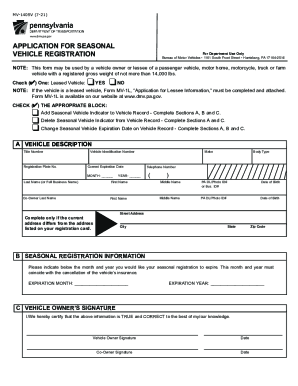
- At the top of the form, check the appropriate block to specify whether you are adding, deleting, or changing a seasonal vehicle registration indicator on a vehicle record.
- If you are adding a seasonal vehicle indicator, complete Sections A, B, and C. In Section A, provide your vehicle's title number, registration plate number, make, vehicle identification number, and current expiration date. Individuals should include their PA Driver's License or Photo ID number, while businesses should list their Business ID number.
- Once you have completed the form, review all information for accuracy. After ensuring everything is correct, save your changes, then download, print, or share the form as needed.
Complete your PA MV-140SV form online today for a seamless seasonal vehicle registration process.
You and the buyer will both need to sign the title at the DMV, where a state employee can witness the process. Do not sign it before this. Remove your license plates only after the title has been transferred. These can be put onto a new vehicle, or turned in to the DMV, but they do not go to the buyer.