Loading
Get Va Dl 8 2016-2026
How it works
-

Open form follow the instructions
-

Easily sign the form with your finger
-

Send filled & signed form or save
How to fill out the VA DL 8 online
Filling out the VA DL 8 form online is a straightforward process that allows eligible drivers to update their self-certification status for commercial driver operations. This guide outlines the necessary steps to ensure accurate and timely submission.
Follow the steps to complete and submit your VA DL 8 online.
- Click ‘Get Form’ button to obtain the form and open it in the editor.
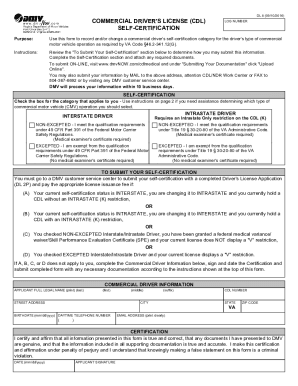
- Review the self-certification categories. Identify if you qualify as an intrastate or interstate driver and select the applicable category by checking the corresponding box.
- Indicate your qualification status by checking either 'Non-Excepted' or 'Excepted.' If you check 'Non-Excepted,' remember a medical examiner's certificate is required.
- Complete the Commercial Driver Information section by providing your full legal name, street address, city, birthdate, daytime telephone number, CDL number, email address, and ZIP code.
- Carefully review your information for accuracy. Ensure your certifications reflect the current operating status and circumstances.
- Sign and date the certification statement confirming all provided information is true and correct.
- After completing all sections, save your changes, download, print, or share the form as needed.
Ensure your documentation is complete and submit the VA DL 8 online today.